
The Best Shopware 6 Plugins for 2026
A Shopware 6 shop only becomes a real sales engine with the right extensions. At the same time, Shopware itself has grown considerably in recent months: many of the monthly Shopware 6.7 releases have brought features into the core that used to require a plugin. So in 2026, the question isn’t just “Which plugin is good?” but also “Do I even still need one for this?”
In this overview, we present our plugins by use case, show what Shopware 6.7 now offers out of the box, and give you a checklist for choosing.
What Shopware 6.7 can now do on its own
Before you install a plugin, it’s worth checking the release notes. Since the start of the 6.7 series, Shopware has shipped new features every month. A few examples from 2026:
- Withdrawal button: For the German requirement that has applied since June 19, 2026, Shopware announced its own implementation with version 6.7.9, according to Xictron. We explain all the details in our article on the withdrawal button in Shopware.
- Agentic commerce: A dedicated sales channel for AI platforms is available in beta. More on this in Agentic commerce with Shopware.
- Administration: Version 6.7.15 brought a reworked navigation, an experimental dark mode and the ability to install or update several extensions at once.
- Accessibility: Shopware is continuously working on accessibility, for example on contrast, focus indicators and keyboard support in the new Admin navigation in 6.7.15. What shop owners need to do themselves is covered in our BFSG checklist.
You’ll find a detailed overview of this year’s changes in our Shopware 6.7 review. For many specialized tasks, though – custom layouts, size charts, branded emails – you’ll still need an extension.
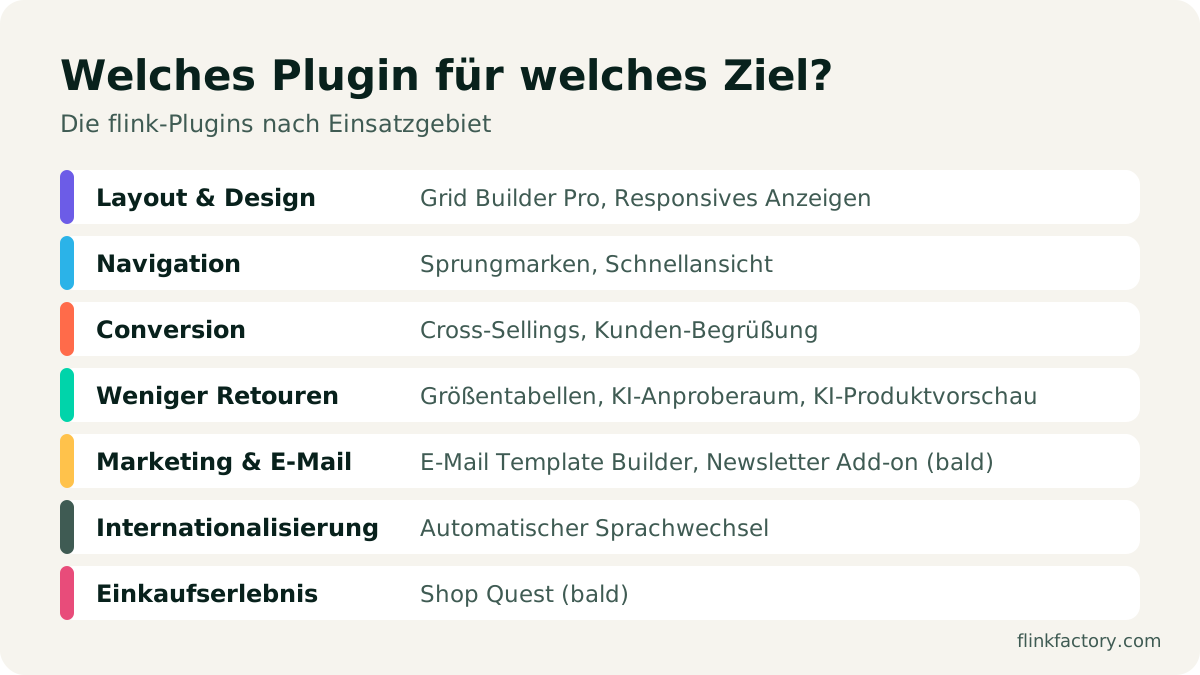
Layout & design
Shopping Experiences are the heart of modern Shopware shops. The default blocks cover a lot, but quickly hit their limits when it comes to custom layouts.
- Grid Builder Pro: Build your own grid layouts for Shopping Experiences right in the Administration, without code. You define a separate layout each for mobile, tablet, laptop and desktop. Eight grid templates are included from the moment you install it, and an optional AI generator creates a grid from a screenshot, a sketch or a text description.
- Responsive Display: Show or hide sections and blocks depending on the device, and check the device views right in the editor. Showing and hiding works without JavaScript and doesn’t slow down page loading.
Navigation & usability
The longer your pages, the more important it is for visitors to find their way around.
- Jump Markers: In-page anchor links via a block, with smooth scrolling, automatic offset for sticky headers and a jump marker navigation in five styles. Ideal for long Shopping Experiences, guides and one-pagers.
- Quick View: A quick view popup shows the most important product details right in the listing. Customers can switch variants in the popup and add the product to the cart without leaving the page.
Conversion & customer loyalty
- Cross-Sellings as a List: By default, Shopware shows cross-selling groups in tabs that many customers overlook. This free plugin shows all groups one below the other as separate product sliders, and it’s also available as an app for Shopware Cloud shops.
- Friendly Customer Greeting: A greeting based on the time of day and the customer’s name, birthday wishes and holiday greetings, in nine languages. Also free.
Fewer returns
Every return you avoid saves shipping, handling and margin, especially in fashion retail.
- Size Charts: Manage size charts centrally and assign them automatically by product, product group, category or manufacturer. Customers see them as a popup on the product page, with a toggle between centimeters and inches. A CSV import makes getting started easier for large catalogs.
- AI Virtual Fitting Room: Customers try on clothing with AI, right in their own photo, for more confident purchase decisions in fashion.
- AI Product Preview: Customers drag and drop products into a photo of their own room. Helpful for furniture, decor and anything where size and look in the room matter.
Marketing & email
- Email Template Builder: Design order confirmations, shipping confirmations and all other Shopware emails with drag and drop, without Twig or HTML. With a live preview for desktop, mobile and dark mode, 25 ready-made templates in your branding and a pre-send check that tests contrast and alt text, among other things.
- Newsletter Add-on (coming soon): This extension for the Email Template Builder brings newsletters right into the Shopware Administration, with templates, audience filters, test emails, send scheduling and reporting all the way down to revenue.
Internationalization
- Automatic Language Switch: Detects the browser language and redirects visitors to the matching language, either directly or after a short popup prompt. Only active after consent to the comfort features.
Shopping experience
- Shop Quest (coming soon): Your shop as a walkable 3D world in the browser: categories become market stalls or rooms, products are on display with image and price, and payment happens in the regular Shopware checkout. Six styles, quests and a Christmas seasonal pack are included.
All plugins compared
| Plugin | Use case | Price from |
|---|---|---|
| Grid Builder Pro | Custom grid layouts in Shopping Experiences | €9.92/month |
| Responsive Display | Show and hide content per device | €8.25/month |
| Jump Markers | Anchor links and page navigation | €5.83/month |
| Quick View | Quick view popup in the listing | €3.75/month |
| Cross-Sellings as a List | All recommendations at a glance | free |
| Friendly Customer Greeting | Personal greetings, holiday wishes | free |
| Size Charts | Size guidance, fewer returns | €8.33/month |
| AI Virtual Fitting Room | Try on fashion with AI | €30.42/month |
| AI Product Preview | See products in your own room | €30.42/month |
| Email Template Builder | Transactional emails with drag and drop | €8.25/month |
| Automatic Language Switch | Language based on the browser language | €4.17/month |
| Newsletter Add-on | Send newsletters from Shopware | coming soon |
| Shop Quest | Your shop as a walkable 3D world | coming soon |
Prices refer to the lowest monthly price with an annual subscription, excluding VAT. You’ll find all terms on the respective plugin pages and in the Shopware Store.
How to choose the right plugins
It’s not the number that counts, but the right selection. Every extension is code that has to be maintained, updated and tested. Check these points for every plugin:
| Criterion | What to look for |
|---|---|
| Compatibility | Does the plugin support your Shopware version, currently 6.7? When was the last update? |
| Core feature | Can Shopware do this on its own by now? A look at the release notes saves money. |
| Performance | Does the plugin load extra JavaScript on every page, or only where it’s needed? |
| Privacy | Is data sent to external services? Is there a consent prompt where required? |
| Accessibility | Can new elements be operated by keyboard, and are they labeled for screen readers? |
| Support | Is there a contact person you can reach, and documentation? |
| Reviews | What do other shop owners report in the Shopware Store? |
Conclusion
The best plugins solve a specific problem, fit seamlessly into your shop and are reliably maintained. First check what Shopware 6.7 can do on its own, then add extensions specifically where your shop should stand out from the standard: layout, guidance, returns or marketing.
Not sure which extensions are right for your shop, or need a feature that doesn’t exist yet? Get in touch. We’re happy to advise you and can also develop custom solutions on request. You’ll find all extensions in our plugin overview.
Sources
You might also like
Shopware 6.7 in Review: What the 2026 Updates Delivered
Eleven minor releases, a withdrawal button, an AI sales channel and new mandatory EU information: here's what Shopware 6.7 brought merchants in 2026, and what to watch out for when you update.
November 9, 2026 · 6 minE-CommerceChristmas Season 2026: Experience Over Discount Wars in Your Shopware Shop
Online sales are growing while retail sentiment is subdued: what the 2026 HDE forecast for Germany means for Shopware shops, and how to stand out from the crowd without joining a pure discount war.
November 5, 2026 · 7 min