
Accessibility in Your Shopware Shop: BFSG, Cease-and-Desist Letters and a Checklist
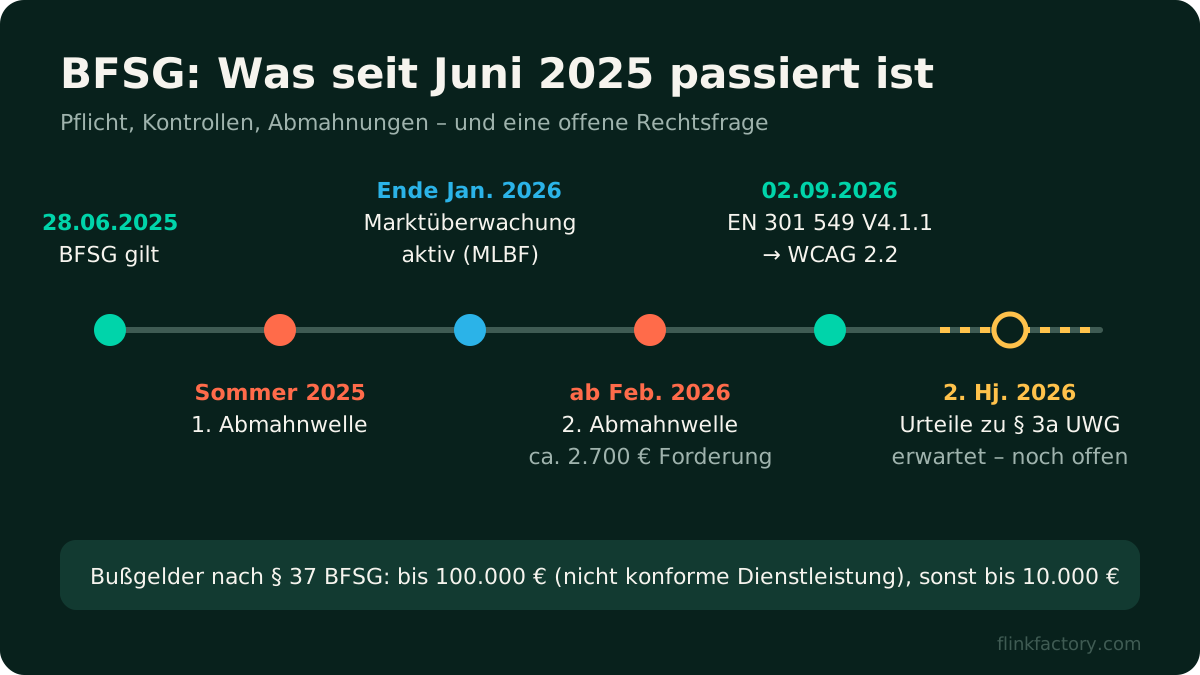
Since June 28, 2025, the German Accessibility Strengthening Act (Barrierefreiheitsstärkungsgesetz, BFSG) has been in force. It’s Germany’s implementation of the European Accessibility Act. For many shop owners, it was a topic “for later” for a long time. Now it has arrived: market surveillance is active, and since February 2026 a second wave of Abmahnungen (formal cease-and-desist letters, a common enforcement tool in German competition law) has been underway. At the same time, a lot is still unresolved.
This article gives you a sober overview: who is affected, what you’re really risking, what Shopware 6.7 already handles for you, and what you need to check yourself. At the end, there’s a checklist you can use to run a rough check of your shop in an hour.
Who is affected by the BFSG?
The BFSG applies to certain products and services, and these explicitly include “services in electronic commerce”. According to § 2 BFSG, this means digital services provided electronically via websites or apps at the individual request of a consumer “with a view to concluding a consumer contract”. So a classic B2C online shop falls under it.
The only exemption is for micro-enterprises that provide services (§ 3 para. 3 BFSG). Under § 2 BFSG, a micro-enterprise is a business that
- employs fewer than ten people and
- either has an annual turnover of no more than €2 million or an annual balance sheet total of no more than €2 million.
Both conditions must be met together. If you have ten employees, you’re outside the exemption, no matter how small your revenue is.
| Situation | Affected? |
|---|---|
| B2C shop, 12 employees, €1.5M revenue | Yes – more than nine employees |
| B2C shop, 4 employees, €900,000 revenue | No – micro-enterprise (service) |
| Pure B2B shop (business customers only) | Usually not – no consumer contract |
| Mixed B2B + B2C shop, 25 employees | Yes – for the B2C part |
Even if you qualify for the exemption, accessibility is still worth it. A shop that’s easy to operate is also easier to use for older customers, people with impaired vision, or anyone who only has one hand free at the moment.
What happens if you don’t comply?
There are two ways an inaccessible shop can get into trouble:
1. Official market surveillance. The responsible body is the joint market surveillance authority of the German federal states (MLBF). It adopted its strategy at the end of January 2026 and has been in an active enforcement phase since then (overview by D!E). Fines are set out in § 37 BFSG: anyone who offers or provides a non-compliant service risks up to €100,000; other violations (such as missing information) carry fines of up to €10,000. Until recently, publicly documented individual fines against online shops were barely known.
2. Cease-and-desist letters from competitors. This is where things get murky. Two waves have been reported: a first one from summer 2025, shortly after the law came into force, and a second one since February 2026 with demands of around €2,700 (D!E, Die Mainagentur).
The open question: are competitors even allowed to send cease-and-desist letters?
Whether competitors can pursue a BFSG violation this way depends on whether the BFSG counts as a so-called market conduct rule under § 3a UWG (the German Act Against Unfair Competition). No court has ruled on exactly this so far. According to our research, as of September 2026 there’s no published decision on it (itmr legal, D!E). The first rulings were expected in the second half of 2026.
That doesn’t mean you should ignore cease-and-desist letters. But it does mean that not every demand is automatically justified, and pre-drafted cease-and-desist declarations belong on a specialist lawyer’s desk before you sign them.
Which standard applies? WCAG 2.1 or 2.2
The BFSG itself doesn’t name a WCAG version. In practice, the European standard EN 301 549 is the benchmark. Its new version V4.1.1 was published on September 2, 2026 and raises the web requirements from WCAG 2.1 to WCAG 2.2 (levels A and AA) (DWT, National Disability Authority). According to the sources available to us, it’s not yet fully settled when the new version will formally count as a harmonized standard.
For you as a shop owner, the practical consequence is simple: aim for WCAG 2.2 AA. Most criteria are identical to 2.1. New requirements include sufficiently large click targets, a visible focus that isn’t obscured, and simpler sign-in without puzzles or memory tests.
What Shopware 6.7 already does for you
The good news: Shopware has done a lot in recent versions. According to the official developer documentation, Shopware aims to meet WCAG 2.1 AA and BITV 2.0 (the German accessibility regulation for public-sector websites) in the storefront. The improvements arrived from 6.6 onwards behind the ACCESSIBILITY_TWEAKS feature flag and have been the default since 6.7.0. They include, for example:
- better keyboard support (zoom modal, closing the flyout navigation with Esc, no focus jump after closing modals),
- clearer focus states,
- meaningful headings and labels in login, registration and the cart,
- alt text for product images in the cart,
- support for 200% text resizing.
But Shopware itself says there are still open issues, and the improvements are arriving step by step with the minor releases. Above all, the core only covers the core.
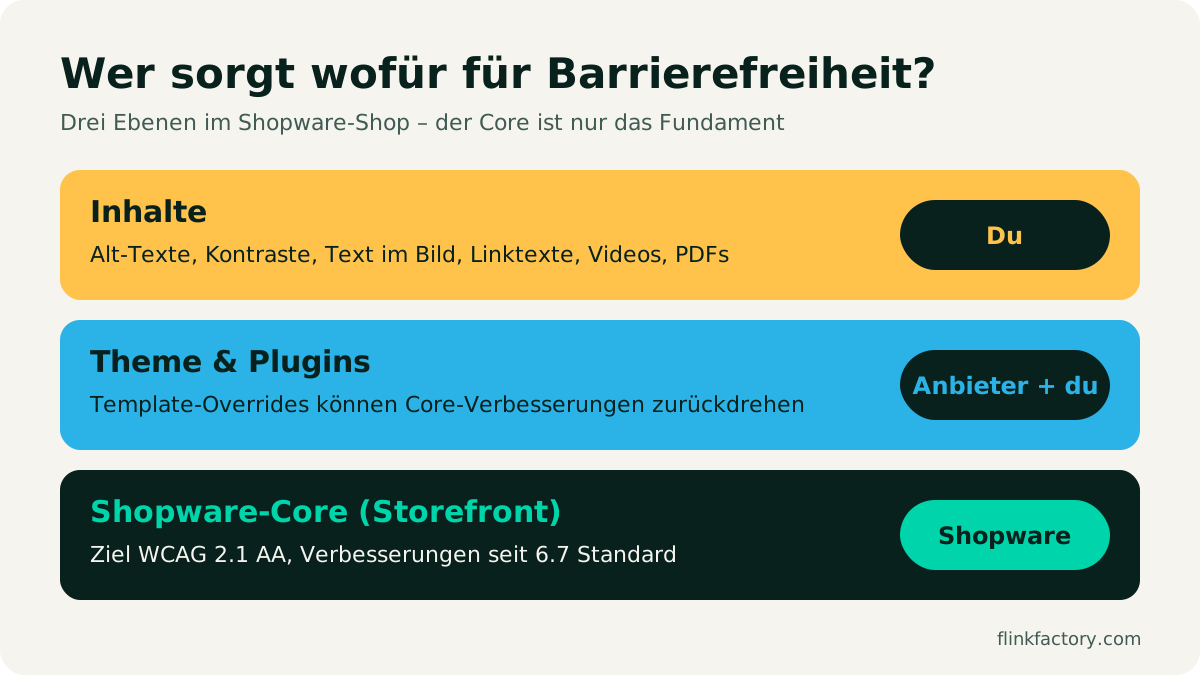
The two layers above it are up to you:
- Theme and plugins: Many themes and extensions override Twig blocks of the storefront. That way, they can quietly undo Shopware’s improvements (Xictron on this). Ask your theme vendor where they stand, and test it yourself.
- Content: Alt text, color contrast in Shopping Experiences, banners with text baked into the image, link text like “click here”, PDF data sheets, videos without subtitles – no shop system can solve these for you.
Why overlay tools don’t help
You may have seen offers like “BFSG compliance in 5 minutes”: a script that places an accessibility toolbar over your shop. The problem is that overlays don’t change the actual page. Missing alt text, unlabeled form fields, weak contrast and missing keyboard support all remain in the code. Screen reader users often have their own, better-suited tools, and the overlay can even interfere with them.
An overlay won’t make you legally compliant. You’re better off putting the time and money into the checklist below.
Checklist: test your Shopware shop yourself
All you need is a browser, a keyboard and an hour. Go through the most important paths: home page → category → product → cart → checkout → customer account.
| Area | Check | How to test |
|---|---|---|
| Keyboard | All links, buttons, menus and forms can be reached without a mouse | Go through the purchase process using only Tab, Shift+Tab, Enter, Space and Esc |
| Focus | The focus is always visible and not hidden by a sticky header or cookie banner | While tabbing, pay attention to where you are |
| Images | Product, banner and Shopping Experience images have meaningful alt text; decorative images are empty | Check alt text in the media management; use a browser extension like axe DevTools |
| Contrast | Text has a contrast of at least 4.5:1 against the background (large text 3:1), banners included | Contrast checker (e.g. in Chrome DevTools) on buttons, prices, notices |
| Text in images | No important information only as text in an image (discount banners!) | Look at the banners: is the content also there as real text? |
| Forms | Every field has a visible label; error messages say what’s wrong | Fill in registration and checkout incorrectly on purpose |
| Structure | One H1 per page, logical heading order, descriptive link text | Browser extension “HeadingsMap” or axe |
| Zoom | At 200% zoom, everything stays usable and nothing overlaps | Ctrl/Cmd + Plus up to 200% |
| Click targets | Buttons and icons are large enough (WCAG 2.2: at least 24 × 24 px) | Test with your thumb on a smartphone |
| Media | Videos have subtitles; nothing starts automatically with sound | Check product videos and hero sliders |
| Theme & plugins | No overrides that undo Shopware’s improvements | Repeat the same test in the default theme and compare |
| Emails | Order and shipping emails are readable (contrast, alt text, real text) | Send a test email to yourself with images turned off |
| Statement | Information on the accessibility of your offering can be found in the shop | Check that a corresponding page exists and is linked |
Automated tests like axe or Lighthouse only find some of the problems, and in our experience, the easy ones. A keyboard-only run through the checkout is the most important manual test.
What you should do now
- Find out if you’re affected: Check your number of employees and your revenue or balance sheet total. When in doubt, assume you’re affected.
- Update to Shopware 6.7 if you haven’t already. The accessibility improvements are the default there.
- Work through the checklist and write down the results. The biggest levers are usually alt text, contrast and forms.
- Ask your theme and plugin vendors where they stand.
- Provide information on the accessibility of your shop.
- If you receive a cease-and-desist letter: Stay calm, note the deadlines, get legal advice, and don’t sign anything hastily.
Conclusion
The BFSG isn’t a reason to panic, but it’s not something you should sit out either. Shopware 6.7 takes care of a large part of the technical foundation. The rest – theme, plugins and above all your content – is yours to keep an eye on. With the checklist above, you’re already ahead of many competitors.
Need help implementing this in your theme or in your own extensions? Write to us. We help with audits and fix barriers directly in the code. And in our own plugins, we pay attention to keyboard support and a clean structure.
Sources
- Barrierefreiheitsstärkungsgesetz, § 2 (definitions), § 3, § 37 (fines) – gesetze-im-internet.de (German)
- Shopware: Accessibility in the Storefront – developer documentation
- D!E: Two waves of cease-and-desist letters are underway … (German) (as of September 2026)
- Die Mainagentur: BFSG 2026 – the second wave of cease-and-desist letters (German)
- itmr legal: BFSG 2026 – MLBF audits and cease-and-desist letters (German)
- DWT: European Accessibility Act – ICT Standards Update
- National Disability Authority: EN 301 549 published
- Xictron: Checking a Shopware theme for accessibility (German)
You might also like
The Withdrawal Button: Mandatory Since June 19, 2026 – How to Do It in Shopware
Since June 19, 2026, B2C online shops selling to consumers in Germany have needed an electronic withdrawal function. What § 356a BGB requires, how Shopware implements it from version 6.7.9 and which mistakes to avoid.
July 9, 2026 · 7 minE-CommerceShopware 6.7 in Review: What the 2026 Updates Delivered
Eleven minor releases, a withdrawal button, an AI sales channel and new mandatory EU information: here's what Shopware 6.7 brought merchants in 2026, and what to watch out for when you update.
November 9, 2026 · 6 min