
The Withdrawal Button: Mandatory Since June 19, 2026 – How to Do It in Shopware
Since June 19, 2026, the new § 356a BGB (a section of the German Civil Code, Bürgerliches Gesetzbuch) has been in force in Germany. If you conclude contracts with consumers online, you now have to offer an electronic withdrawal function, commonly called the “Widerrufsbutton” or withdrawal button. There was no transition period.
Shopware has shipped this feature since version 6.7.9.0. In practice, though, simply switching it on often isn’t enough. In this article, you’ll learn what the law requires, how to set up the feature in Shopware and what to look out for when you test it.
Where does the obligation come from?
The basis is EU Directive (EU) 2023/2673, which added a new Article 11a to the Consumer Rights Directive. Germany implemented it with the Gesetz zur Änderung des Verbrauchervertrags- und des Versicherungsvertragsrechts sowie zur Änderung des Behandlungsvertragsrechts (an act amending consumer contract, insurance contract and medical treatment contract law; BGBl. 2026 I No. 28, promulgated on February 5, 2026). The new § 356a BGB has applied since June 19, 2026 (Noerr).
Who is affected?
In short: anyone who concludes distance contracts with consumers via an online interface where a right of withdrawal exists, regardless of size, revenue or legal form (IHK Osnabrück). This covers classic online shops as well as subscriptions, online courses and digital content. Apps also count as an online interface.
Pure B2B shops are not affected, because there’s no statutory consumer right of withdrawal there. Unlike the BFSG (the German Accessibility Strengthening Act), there is no exemption for small businesses.
What § 356a BGB actually requires
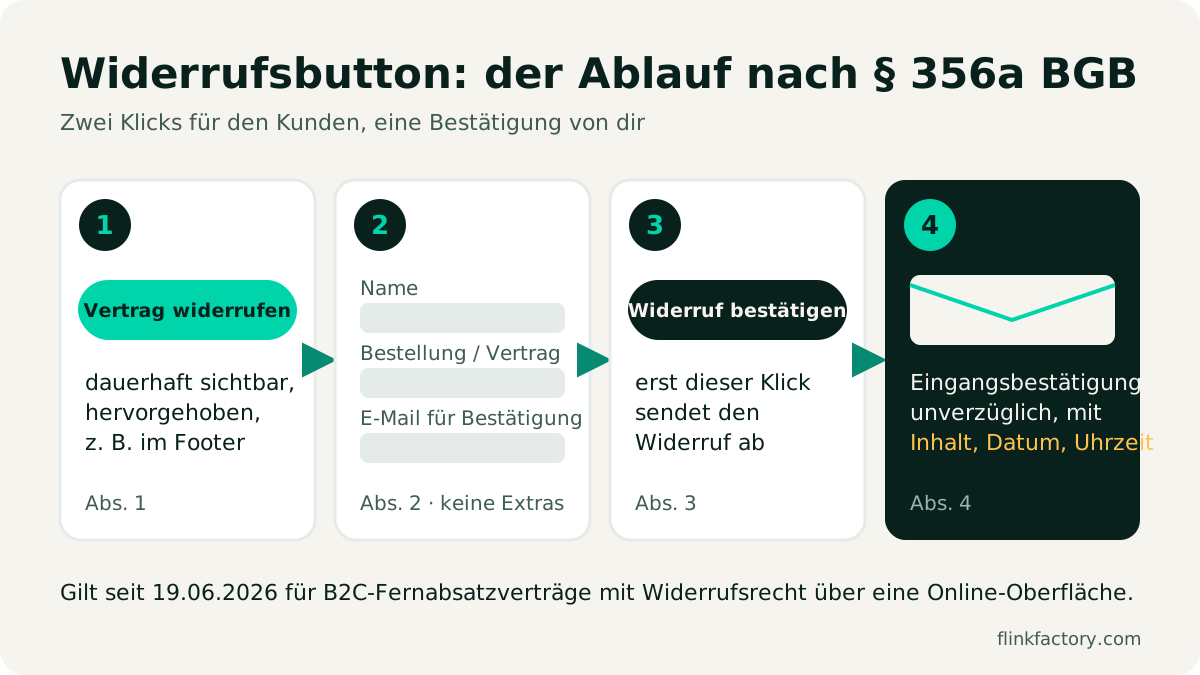
The law describes a clear two-step process:
- Withdrawal function (para. 1): A button with a clearly legible label reading “Vertrag widerrufen” (“withdraw from contract”) or an equivalent unambiguous wording. It must be available throughout the entire withdrawal period, placed prominently and easily accessible.
- Information (para. 2): Through it, the consumer can declare their withdrawal and enter or confirm their name, the details of the contract (or part of the contract) they want to withdraw from, and the electronic channel for the confirmation of receipt.
- Confirmation function (para. 3): Only a second button, labeled “Widerruf bestätigen” (“confirm withdrawal”) or equivalent, actually sends the withdrawal.
- Confirmation of receipt (para. 4): You must confirm without undue delay on a durable medium (in practice, by email) that the withdrawal has been received, including at least the content of the withdrawal and the date and time of receipt.
- Meeting the deadline (para. 5): A withdrawal made through this function counts as on time if it was sent before the deadline expired.
What matters in practice (IHK Osnabrück, Noerr):
- No additional required fields. You may not make the reason for withdrawal mandatory. An optional field is a different matter, but it must not make the process harder.
- Easy to find, but distinguishable. The button should be reachable from every page (typically the footer), but it should stand out visually from regular links such as the imprint or terms and conditions.
- Login only in exceptional cases. The legislative explanatory memorandum only allows a mandatory login if the contract can only be concluded via a customer account anyway. Shops with guest checkout therefore need a way to withdraw without logging in.
- Confirmation via the chosen channel. Since the final version of the law, the confirmation “must” be sent via the channel the consumer specified, not via another channel of your choosing.
- Update your withdrawal policy. The model in Annex 1 to Art. 246a EGBGB (the Introductory Act to the German Civil Code) has been extended with a design note on the withdrawal function. Check that your policy is up to date.
How Shopware implements the withdrawal button
Shopware introduced the feature in version 6.7.9.0 (April 16, 2026) as an “Online revocation request form” (Release Notes). Like the contact form, the form is placed via Shopping Experiences. According to the community, the feature has also been backported to 6.6.x. For 6.7, the rule is: update to at least 6.7.9.
Step-by-step setup
The release notes themselves are brief. In the Shopware forum, the following approach has proven itself. Menu labels may differ slightly depending on your version:
- Update to Shopware 6.7.9 or newer (currently, the latest 6.7 version makes sense).
- Under Settings → Basic information, enable the withdrawal button in the legal/privacy section. Shopware then shows “Vertrag widerrufen” in the footer.
- Assign a shop page for the withdrawal form. Shopware ships a default layout for this. If it’s missing (this has been reported after updates from older versions), create a new Shop page in Shopping Experiences, add a form, set the form type to revocation/withdrawal and select the page under Basic information.
- Check the email templates: The confirmation of receipt sent to the customer must include the content, date and time. Send yourself a test withdrawal.
- Check your theme: Shopware renders the footer entry as a button (
btn btn-primary). Some themes style it like a regular link, and then it’s no longer “prominent”.
What Shopware covers, and what you need to check
| Requirement (§ 356a BGB) | How Shopware covers it | What you should check |
|---|---|---|
| ”Vertrag widerrufen” button, prominent, always reachable | Footer button after enabling it under Basic information | Visible in your theme? On mobile too? Does it differ from regular links? |
| Entering name, contract and confirmation channel | Withdrawal form type in Shopping Experiences | Does it work for guests without a login? No unnecessary required fields? |
| Second step “Widerruf bestätigen” | Confirmation step in the form | Is the label unambiguous? Is nothing sent on the first click? |
| Confirmation of receipt with content, date, time | Email to the customer and the shop owner | Does the email really contain everything? Does it arrive (spam, mail plugins)? |
| Available throughout the withdrawal period | Button is permanently in the footer | Reachable in maintenance mode or on special pages (checkout layout) too? |
| Up-to-date withdrawal policy | not part of the software | Policy or legal-text provider updated? |
Common mistakes
- Enabled, but not tested. The footer link appears, but the assigned page is missing or the form doesn’t send an email.
- The button looks like a link. The theme overrides the styling, and then it may not count as “prominent”.
- Mandatory login despite guest checkout. Anyone who ordered as a guest must be able to withdraw without an account.
- Too many required fields. Making the reason for withdrawal, phone number or customer number mandatory isn’t allowed for.
- Confirmation email without the time. The date and time of receipt must be included.
- Outdated withdrawal policy. The reference to the withdrawal function is missing.
- Custom checkout layout without a footer. If certain pages don’t show a footer, check that the button is still easy to reach some other way.
What happens if the button is missing?
A missing button is very easy to spot from the outside. Experts therefore expect Abmahnungen (formal cease-and-desist letters, a common enforcement tool in German competition law) from competitors and associations (Noerr). The IHKs (German chambers of commerce) point to civil and competition-law consequences as well as possible fines. We couldn’t reliably confirm specific fine amounts for the withdrawal button in the primary sources, so be careful with figures from marketing copy.
The bottom line: implementing it takes little effort, and the risk of a missing button is unnecessary.
Conclusion
The withdrawal button is one of the few legal obligations you can meet almost entirely with Shopware’s built-in tools. What counts is the fine-tuning: a current version, an assigned form page, a visible button in your own theme, a working confirmation email and an updated withdrawal policy. Plan 30 minutes for a complete test run.
Your theme doesn’t play along, or you need withdrawal with a partial selection from the order, connected to your ERP? Talk to us. We adapt Shopware precisely to your processes. You’ll find more extensions for your shop in our plugin overview.
Sources
- § 356a BGB – Widerrufsfunktion (withdrawal function), gesetze-im-internet.de (German)
- Noerr: Umsetzungsgesetz zum Widerrufsbutton veröffentlicht (implementing act for the withdrawal button published, German)
- IHK Osnabrück: Withdrawal button mandatory since June 19, 2026 (German)
- Shopware Release Notes 6.7.9.0
- Shopware forum: Widerrufsbutton in Shopware 6.7.9.0 – where to enable it and how to implement it (German)
You might also like
Accessibility in Your Shopware Shop: BFSG, Cease-and-Desist Letters and a Checklist
Germany's Accessibility Strengthening Act (BFSG) has applied since June 2025, and a second wave of cease-and-desist letters has been rolling since February 2026. What the BFSG means for your Shopware shop, what Shopware 6.7 already covers, and a checklist for testing it yourself.
September 24, 2026 · 8 minE-CommerceShopware 6.7 in Review: What the 2026 Updates Delivered
Eleven minor releases, a withdrawal button, an AI sales channel and new mandatory EU information: here's what Shopware 6.7 brought merchants in 2026, and what to watch out for when you update.
November 9, 2026 · 6 min