
Experience Studio: An Overview of Shopware's New Content System
Since Shopware 6, Shopping Experiences have been the tool merchants use to design home pages, category pages and landing pages. Now Shopware is working on their successor: a new content system with a new editor, internally called “Experience Studio”. If you read “Shopware 6.8” and “new CMS” in the same sentence, you’ll quickly wonder: do I have to rebuild my Shopping Experiences? Will my plugins still work?
We develop plugins for Shopping Experiences ourselves, so we took a close look at what exists so far, not just in announcements but directly in the source code on GitHub. The good news first: in the short term, you don’t need to do anything. In the medium term, though, quite a bit will change.
The short version
- The new content system is not a rebuild of Shopping Experiences, but a second, standalone system with its own data model and its own editor.
- It hasn’t landed in Shopware’s main branch yet and has no fixed date. Shopware is currently working on a first alpha or preview version, initially for category and product pages.
- Shopping Experiences will stay, according to Shopware “for an undefined timeframe”, so with no end date.
- Shopware 6.8 (planned for 2027) only brings minor changes to Shopping Experiences.
- Existing layouts won’t be migrated automatically, and Shopping Experience elements won’t work in the new system.
What Shopware says officially
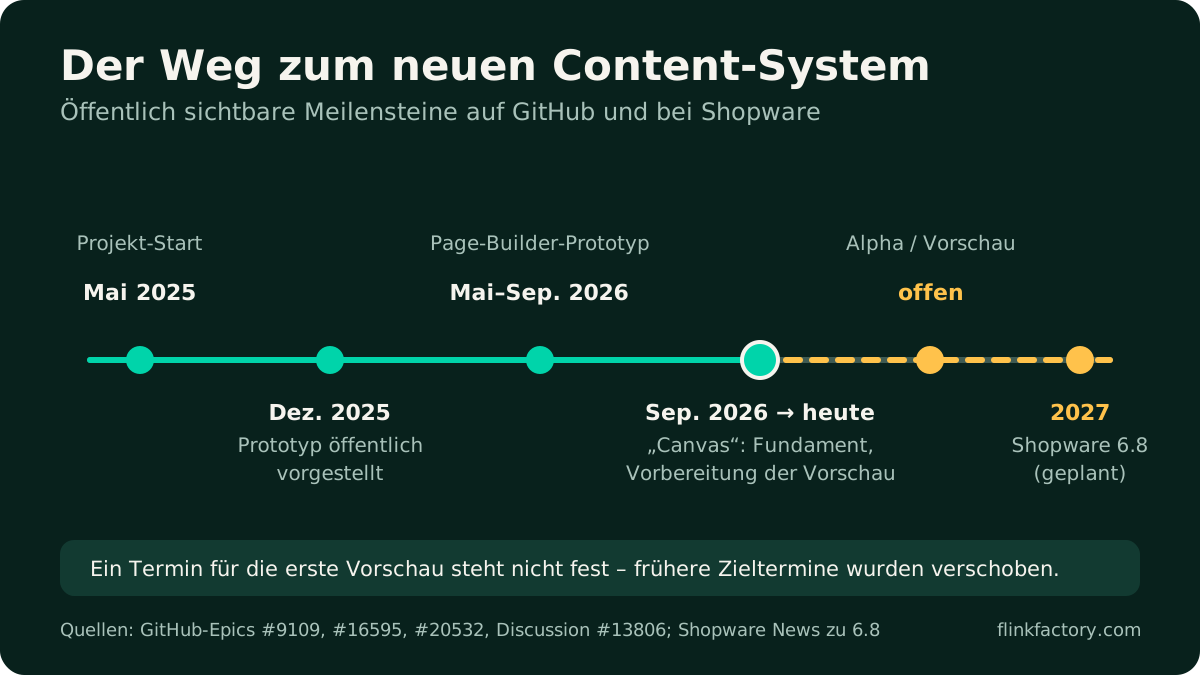
The key statements come from a public discussion on GitHub in which Shopware presented the prototype in December 2025. There, Philipp Schuch from Shopware wrote in February 2026:
“The current CMS system will continue to exist in the product for an undefined timeframe.”
And on the question of whether existing elements can still be used:
“It will not be possible to use ‘old’ CMS elements in the ‘new’ content system.”
The current development project (“Canvas”, Epic #20532, started in September 2026) aims to complete the foundation and prepare an alpha or preview version. Category and product detail pages are named as the first page types. The project explicitly excludes a migration path for existing layouts; that’s only to be looked at in the next milestone.
Be careful with dates: Shopware had previously named interim goals, such as “end of Q1 2026”, that weren’t met. The new content system doesn’t appear as a feature in the Shopware 6.8 announcement.
What’s in the code
The code of the new system lives on the public development branch feat/experience-studio. It already gives a good idea of where things are headed.
A tree instead of fixed levels
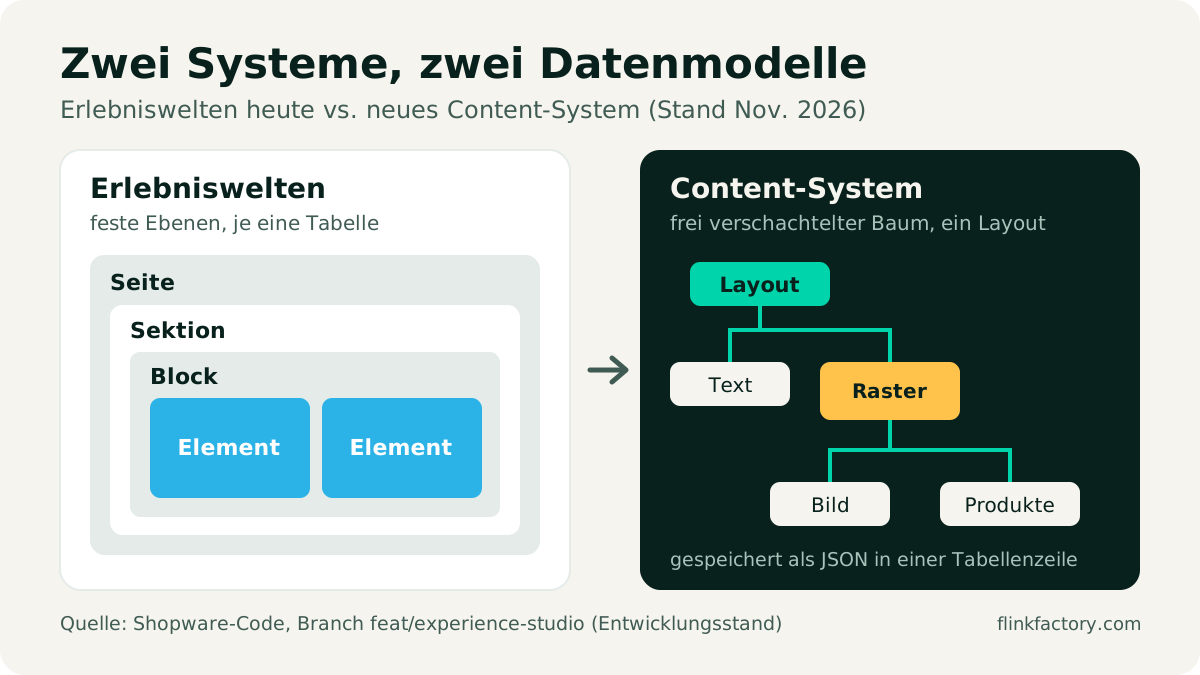
Shopping Experiences have fixed levels: a page consists of sections, sections of blocks, blocks of elements, and each level has its own database table. The new system breaks with this: a layout is a freely nested tree of elements, stored as JSON in a single table row. An element can contain other elements, and a grid can hold text, images or product lists, without the rigid section-block logic.
Grid and per-device visibility right in the core
Two points are especially interesting for merchants:
- A flexible grid as a container element, with columns and rows per screen size, spacing, background, border and shadow. Each element can define how many columns and rows it spans.
- Showing and hiding per screen size as a style option for every element.
Until now, both were only possible to a limited extent in Shopping Experiences, or with plugins.
New editor with live preview
A new module is being built in the Administration alongside the existing Shopping Experiences editor. The code shows a tree view of the layout, an element picker, per-element settings, a live preview via the real storefront, undo/redo, and assignments to products, categories and landing pages. On top of that, there’s data mapping: texts can contain placeholders such as the category name, which are filled in when the page is rendered. On other branches, Shopware is experimenting with an AI mode that’s meant to help build layouts.
Headless from the start
The new system comes with its own Store API endpoints for fetching page content, including the header and footer. Headless shops are explicitly part of the plan.
Shopping Experiences vs. the content system
| Shopping Experiences (today) | New content system (development status) | |
|---|---|---|
| Structure | fixed levels: section → block → element | freely nested tree |
| Storage | one table per level | one layout as JSON |
| Grid | predefined block layouts | flexible grid per screen size |
| Per-device visibility | per block (since 6.5) | for every element |
| Preview | editor view | live preview of the real storefront |
| Plugin extensions | custom blocks, elements and admin components | element types via YAML file plus Twig component |
| Status | stable, stays with no end date | in development, date open |
What does this mean for merchants?
You don’t need to prepare anything for Shopware 6.8. Your Shopping Experiences will keep working. The changes 6.8 brings to the existing system mainly affect internals such as renamed building blocks in the Administration, which is a job for agencies and plugin vendors.
Once the new system is available as a preview, it will come in addition to the existing one. Our assessment of what this means in practice:
- Switching means rebuilding. Since there’s no automatic migration, every page will be recreated in the new editor. Plan this page by page, and start with pages that need reworking anyway.
- Two editors side by side. For a while, there will be two systems. Document within your team which pages are maintained where, so nobody looks in the wrong place.
- Don’t switch too early. An alpha or preview version is for trying things out, not for the most important pages in your live shop. Third-party elements will be missing at first.
- Check your plugins. Ask your plugin vendors whether and when their extensions will support the new system, or whether the core will provide the feature itself in the future.
What does this mean for agencies and plugin developers?
For Shopping Experiences extensions, 6.8 means regular maintenance, as with any major version jump: Twig 4, Symfony 8, the switch to new Admin tabs and a few removed template blocks. According to the upgrade notes, the Shopping Experiences database tables and the registration of custom blocks and elements are not marked as deprecated.
For the new system, on the other hand, it’s a rebuild:
- Element types are described as a YAML file and rendered as a Twig component (Symfony UX), optionally with their own data loader.
- The settings form in the Administration is generated automatically from the YAML file. Based on the current code, there’s a fixed set of field types for this; custom Admin interfaces per element aren’t planned.
- Existing components can’t simply be overridden. Shopware says: “There is no native way to fully override an existing component.”
- Apps can ship element types, style options and templates as pure data, which puts them on a much more equal footing than before.
- Almost all classes are marked as
@internal. If you build on them today, expect changes.
What does this mean for our plugins?
If you use our plugins for Shopping Experiences, such as Grid Builder Pro, Jump Markers or Responsive Display, nothing changes for now because of the new content system: they work with Shopping Experiences, and those are staying. As with every version jump, we’ll take care of the regular adjustments for Shopware 6.8.
We’re keeping a close eye on the new system. Some things that plugins handle today, it will provide itself. In other areas, such as ready-made layout templates or anchor links, there will still be room for extensions.
Conclusion
Shopware isn’t rebuilding Shopping Experiences, it’s putting a modern successor alongside them: more flexible in structure, with a live preview and clear rules for extensions. It will probably take some time before it becomes a finished tool for live shops. There’s no date, and Shopping Experiences will remain with no end date. If you’re planning now, keep an eye on the new system, but don’t rush anything.
Want to know what the new content system means for your shop or your own extensions? Talk to us. We work with Shopping Experiences and their successor every day.
Sources
- GitHub Discussion #13806: Content System Prototype
- GitHub Epic #20532: Canvas – Foundation set
- GitHub Epic #9109: New Content System and Epic #16595: Page builder prototype
- Shopware code, branch feat/experience-studio: ContentSystem
- Shopware News: Next major version 6.8 planned for 2027
- Shopware Developer Docs: Storefront Components
You might also like
Shopware 6.7 in Review: What the 2026 Updates Delivered
Eleven minor releases, a withdrawal button, an AI sales channel and new mandatory EU information: here's what Shopware 6.7 brought merchants in 2026, and what to watch out for when you update.
November 9, 2026 · 6 minPluginsThe Best Shopware 6 Plugins for 2026
Our updated picks for 2026: which Shopware 6 plugins really make a difference, what Shopware 6.7 can now do on its own, and what to look for when choosing.
July 20, 2024 · 7 min