
Newsletter Marketing with Shopware 6: Providers, Plugins and What Shopware Can Do on Its Own
For many online shops, the newsletter is still one of the most important channels: recipients signed up themselves, there are no per-click costs, and a good campaign brings in measurable revenue, especially during periods like the Christmas season. If you work with Shopware 6, though, you’ll quickly notice that there’s no newsletter editor with a sending function anywhere in the Administration.
In this article, we look at what Shopware offers out of the box, which providers and plugins are available, which solution is worth it for whom, and why we’re building a third option with the Newsletter Add-on for our Email Template Builder.
What Shopware 6 can do out of the box
The Shopware documentation is clear on this point: “Shopware does not have a built-in function to send newsletters.” Instead, Shopware takes care of the foundation – the recipients – and leaves the sending to other tools.
| Feature | Included in Shopware 6? |
|---|---|
| Sign-up form (e.g. as a Shopping Experience or in the footer) | yes |
| Double opt-in, including for registered customers | yes, under Settings → Content → Newsletter |
| View and edit the recipient list | yes, under Marketing → Newsletter recipients |
| Unsubscribe and recipient status | yes |
| Export recipients via Import/Export | yes |
| Design newsletters (editor, templates) | no |
| Send newsletters to recipients | no |
| Track opens, clicks, revenue | no |
So Shopware provides a solid foundation: sign-up with double opt-in, which the GDPR effectively requires for marketing emails in practice, and a well-maintained recipient list. For everything after that, you need an extension.
External providers with a Shopware integration
Most shops use a specialized email marketing provider. It connects to Shopware via a plugin, imports recipients (and, depending on the provider, order and behavioral data too) and handles design, sending and reporting. In the Shopware Store, you’ll find these integrations, among others:
| Provider | Focus | Integration in the Shopware Store | Good fit for |
|---|---|---|---|
| CleverReach | Newsletters and automation, servers in Germany | free connector, also for Shopware Cloud | shops that want a German provider |
| rapidmail | simple newsletters, German provider | free connector | small shops with a classic newsletter |
| Brevo (formerly Sendinblue) | Newsletters, SMS, WhatsApp, automation | free connector | shops that want to cover several channels |
| Klaviyo | Marketing automation with real-time purchase and behavioral data | official, free connector | growing shops with many automated flows |
| Dotdigital, XQueue Maileon, Spotler | Enterprise marketing platforms | connector in the store | larger retailers with their own CRM team |
| ActiveCampaign | Marketing automation and CRM | via a third-party plugin (paid) | shops already using ActiveCampaign |
| Mailchimp | Newsletters and automation | the former Mailchimp plugin is no longer in the store; today only third-party sync plugins | existing Mailchimp customers |
Mailchimp is a special case: there used to be a Mailchimp plugin for Shopware 6, but it has since been removed from the store, and its ratings were very poor toward the end. If you want to connect Mailchimp to Shopware today, you’ll have to rely on third-party sync plugins and should check their reviews and how up to date they are carefully beforehand.
Important for your budget: the connectors are usually free, and the real costs are with the provider, usually based on the number of contacts or emails sent. With growing lists, this can add up. You’ll find current prices directly with each provider.
Strengths and weaknesses of external providers
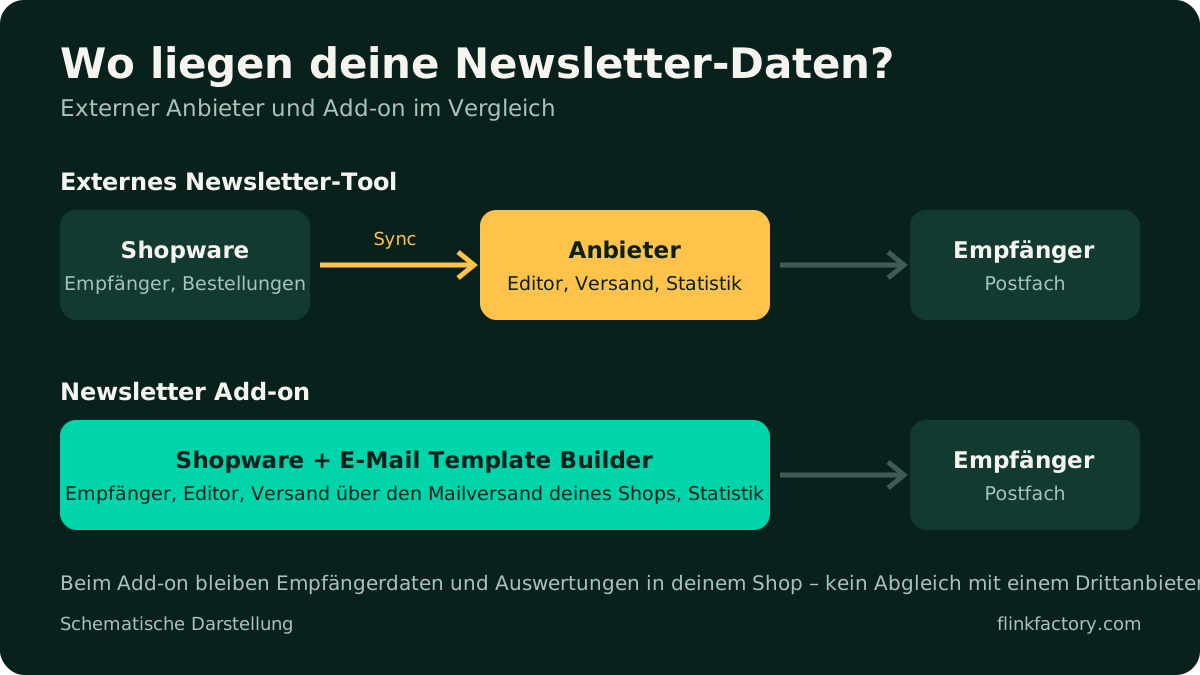
External providers are mature: they come with automations such as abandoned cart emails or welcome series, take care of deliverability and sending infrastructure, and offer extensive reporting. But there are downsides too:
- Data leaves the shop. Recipients, and often order data too, are synced to the provider. Under the GDPR, you need a data processing agreement, and the sync has to run reliably.
- A second design system. You design your shop emails in Shopware and your newsletters at the provider. You maintain logo, colors and building blocks twice.
- Ongoing costs grow with your list, even if you only send a newsletter once or twice a month.
The third option: newsletters right in Shopware
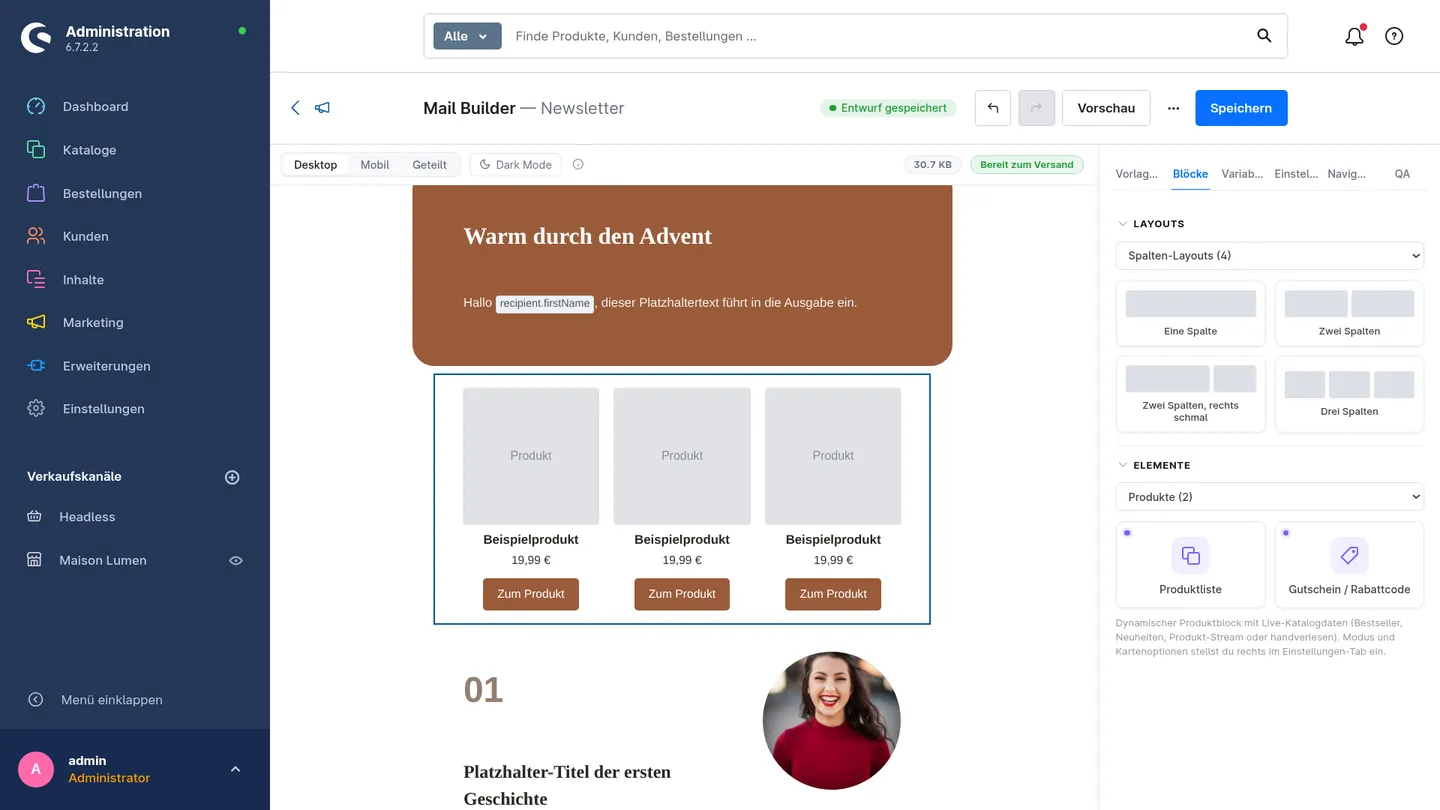
Many of our customers already design their order confirmations, shipping emails and all other shop emails with the Email Template Builder, using drag and drop, a brand kit and a live preview. The obvious question was: why not build newsletters in the same editor and send them straight from Shopware?
That’s exactly what the Newsletter Add-on does. It extends the Email Template Builder with newsletter campaigns to your Shopware newsletter recipients, with no external tool and no data sync with a third party.
What the Newsletter Add-on can do
- Design in the editor you know: six newsletter starter templates in your branding, and products added with drag and drop, showing real images and prices in the preview.
- The right audience: confirmed newsletter recipients of a sales channel and language, filterable by customer groups, tags, order history and engagement, with a live count of the recipients you’ll reach.
- Send safely: a pre-send checklist, a preview with real shop data, test emails and scheduled sending. Sending runs via the message queue with a rate limit and batch size, and stops automatically after repeated errors.
- Get more out of every campaign: A/B tests for subject lines, resending to recipients who didn’t open or click, and personal voucher codes from your Shopware promotions.
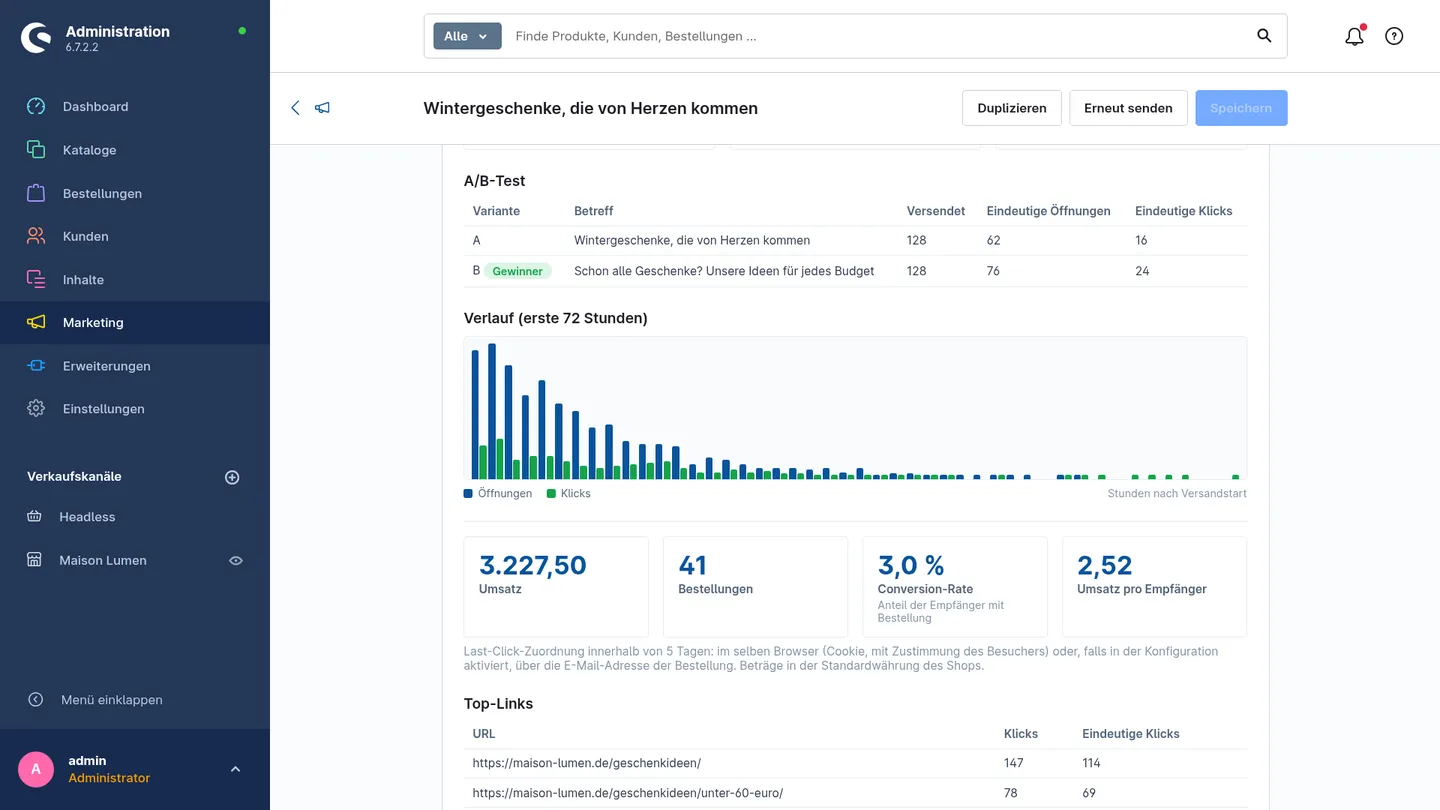
- Measure success: opens, clicks, top links, unsubscribes and a timeline, all the way to the attributed orders and revenue.
- Privacy built in: one-click unsubscribe including the List-Unsubscribe header, and a blocklist with CSV import and export. Tracking can be turned off per sales channel, IP addresses aren’t stored, and cookie-based revenue attribution only kicks in after consent.
To be honest: what the add-on isn’t meant for
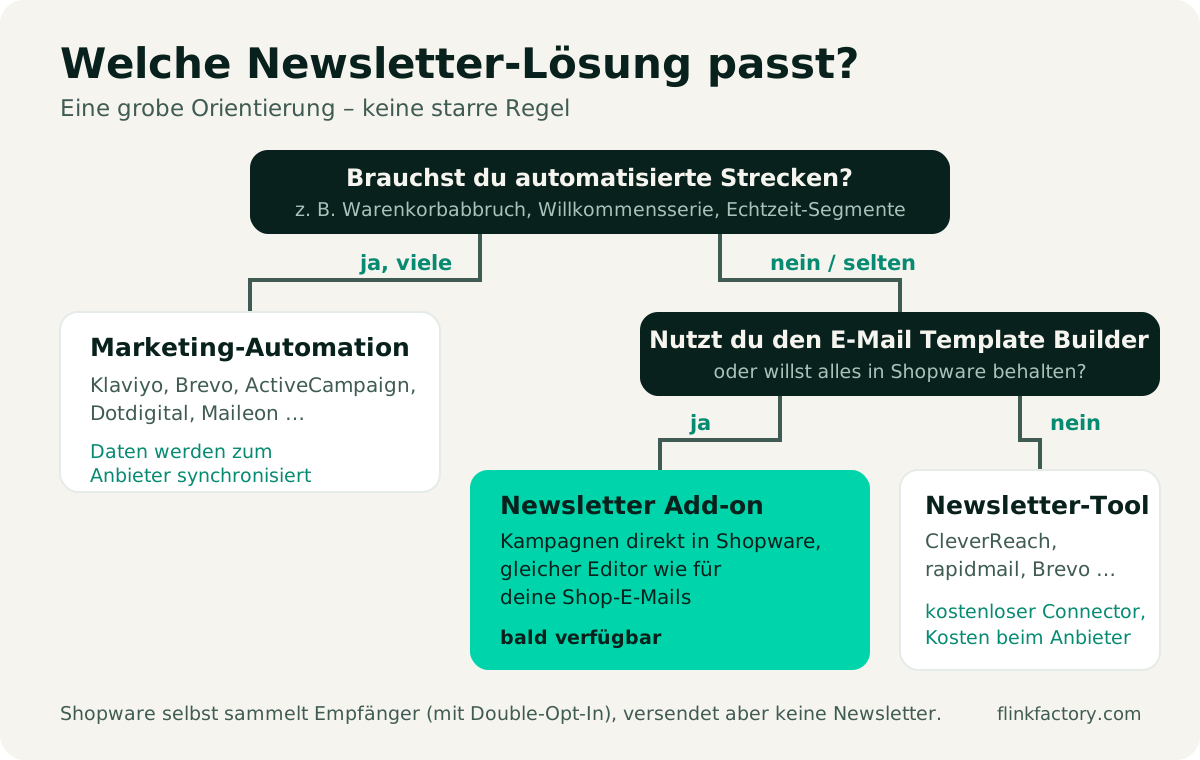
The Newsletter Add-on is built for campaigns, meaning the classic newsletter that you plan, design and send to your recipients. It doesn’t include multi-step automations such as abandoned cart flows or welcome series. For those, platforms like Klaviyo or Brevo are the better choice.
Also, the add-on sends via your shop’s mail delivery. For larger lists, we recommend a high-performance SMTP service with properly configured sender records (SPF, DKIM, DMARC) and a rate limit below your provider’s limit. Both can be configured in the add-on.
Which option is right for whom?
| Your shop | Our recommendation |
|---|---|
| You want to send newsletters regularly and keep everything in Shopware | Newsletter Add-on with the Email Template Builder |
| You already use the Email Template Builder for your shop emails | Newsletter Add-on – one editor, one brand for all emails |
| You need many automated flows and real-time segments | Klaviyo, Brevo or another automation platform |
| You work with a large marketing team and your own CRM | An enterprise platform like Dotdigital or Maileon |
| You already use a newsletter tool and are happy with it | Stick with it – switching mainly pays off if costs or double maintenance bother you |
By the way, the two approaches aren’t mutually exclusive: some shops use an automation tool for abandoned carts and send their regular newsletters directly from Shopware.
Try it early: how to get the add-on now
The Newsletter Add-on is currently under review at Shopware and will be available in the Shopware Store soon. But you don’t have to wait:
That way, you can already send your next newsletter, for example for the holiday season, straight from Shopware, and give us valuable feedback at the same time.
Checklist: getting started with newsletter marketing in Shopware
Whichever solution you choose, take care of these points before your first send:
- Enable double opt-in under Settings → Content → Newsletter, for registered customers too.
- Make the sign-up visible: a form in the footer, in the checkout or on a dedicated page, with a clear statement of what subscribers can expect.
- Update your privacy policy: sending, the provider you use and tracking (opens, clicks) must be described there.
- Set up your sender properly: your own domain, SPF, DKIM and DMARC. This plays a big part in whether your emails land in the inbox.
- Offer one-click unsubscribe in every email.
- Test first, then send: send a test email to yourself, check it on desktop and smartphone, and check the links.
- Review the results after sending and let them inform your next campaign.
Conclusion
With sign-up, double opt-in and recipient management, Shopware 6 lays the foundation, but you have to design and send the actual newsletter elsewhere. External providers are the right choice if you need extensive automations. But if you want to send campaigns regularly, keep your data in the shop and design all your emails in one editor, the Newsletter Add-on for the Email Template Builder is the direct route.
Curious? Ask us for early access or take a closer look at the Newsletter Add-on.
Sources
You might also like
Christmas Season 2026: Experience Over Discount Wars in Your Shopware Shop
Online sales are growing while retail sentiment is subdued: what the 2026 HDE forecast for Germany means for Shopware shops, and how to stand out from the crowd without joining a pure discount war.
November 5, 2026 · 7 minPluginsThe Best Shopware 6 Plugins for 2026
Our updated picks for 2026: which Shopware 6 plugins really make a difference, what Shopware 6.7 can now do on its own, and what to look for when choosing.
July 20, 2024 · 7 min