
Shopware 6 Performance Optimization: The 2026 Guide
A fast shop sells better, and Google factors load time into its rankings through the Core Web Vitals. The good news: most Shopware shops don’t get fast through exotic tricks, but through a handful of basics that often simply haven’t been set up. We’ve completely reworked this guide for Shopware 6.7. It replaces our article from 2024.
First things first: measure before you optimize. PageSpeed Insights shows you real user data (field data) for your shop, while the Shopware Administration and your hosting monitoring show you where the server starts to struggle.
The priorities at a glance
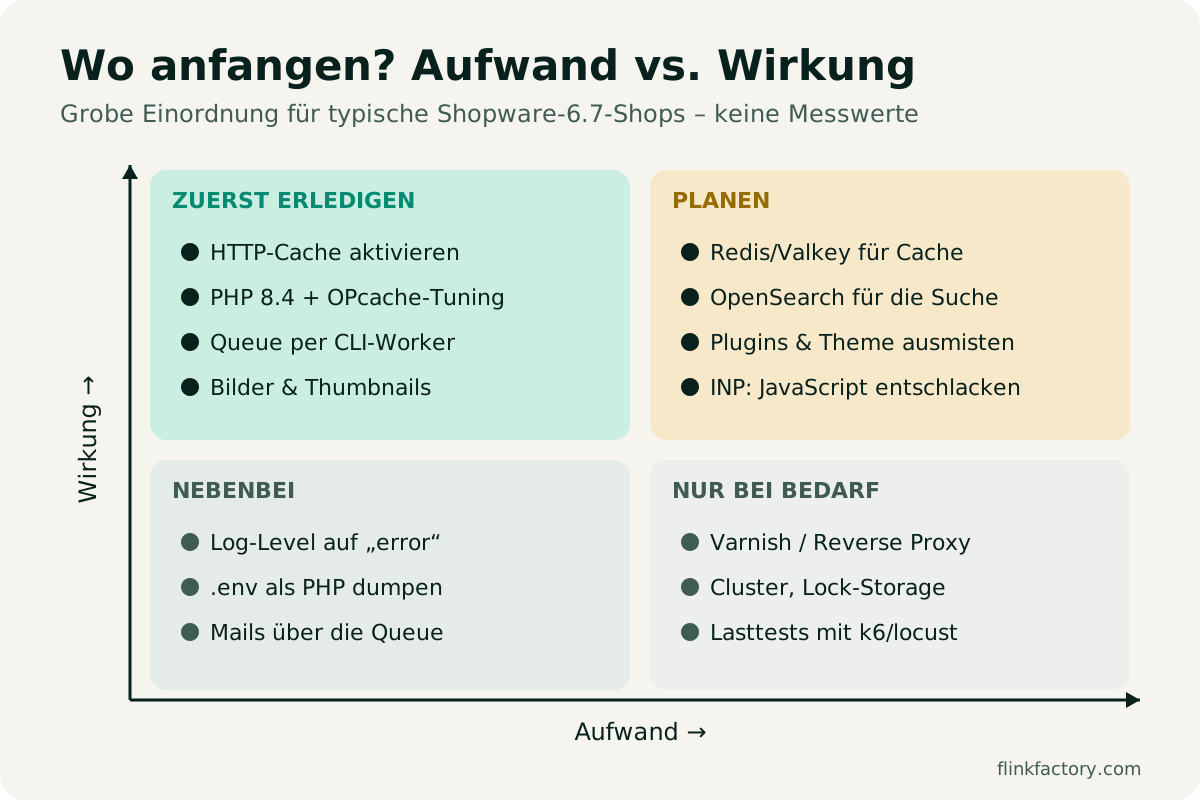
| Measure | Effort | Impact | For whom |
|---|---|---|---|
| Enable the HTTP cache | low | very high | all shops |
| PHP 8.4 + OPcache settings | low | high | all shops |
| Queue and scheduled tasks via CLI worker | low to medium | high | all shops |
| Optimize images and thumbnails | low to medium | high (LCP) | all shops |
| Redis/Valkey for cache and sessions | medium | medium to high | from medium traffic |
| OpenSearch for search and listings | medium | high for large catalogs | from a few thousand products |
| Clean up plugins and theme JavaScript | medium | high (INP) | shops with many extensions |
| Varnish as a reverse proxy | high | very high with heavy traffic | multiple app servers |
1. The right server stack for Shopware 6.7
The foundation is an up-to-date stack. According to the official hosting documentation, the following applies to Shopware 6.7:
| Component | Minimum | Recommended |
|---|---|---|
| PHP | 8.2 | 8.4 |
| MySQL / MariaDB | MySQL 8.0.22 / MariaDB 10.11.6 | MySQL 8.4 / MariaDB 11.4 |
| Redis-compatible cache (optional) | Redis 7 | Valkey 8.0 |
| Search (optional) | OpenSearch 1.0 / Elasticsearch 7.8 | OpenSearch 2.17.1 |
| Node.js (for builds) | 20 | 24 |
On top of that, you need a memory_limit of at least 512M and a max_allowed_packet of at least 32M in the database. Important: MySQL’s so-called “Innovation Releases” aren’t supported, so use the LTS versions.
Many shops are still running on PHP 8.1 or 8.2. Switching to 8.4 usually takes just one click at your hosting provider and gives you a noticeable speed boost. Check beforehand that all your plugins are compatible.
2. HTTP cache: the most important lever
The HTTP cache serves fully rendered pages without Shopware having to compute them from scratch every time. You enable it with an environment variable: SHOPWARE_HTTP_CACHE_ENABLED=1 in the .env file (Shopware Performance Tweaks).
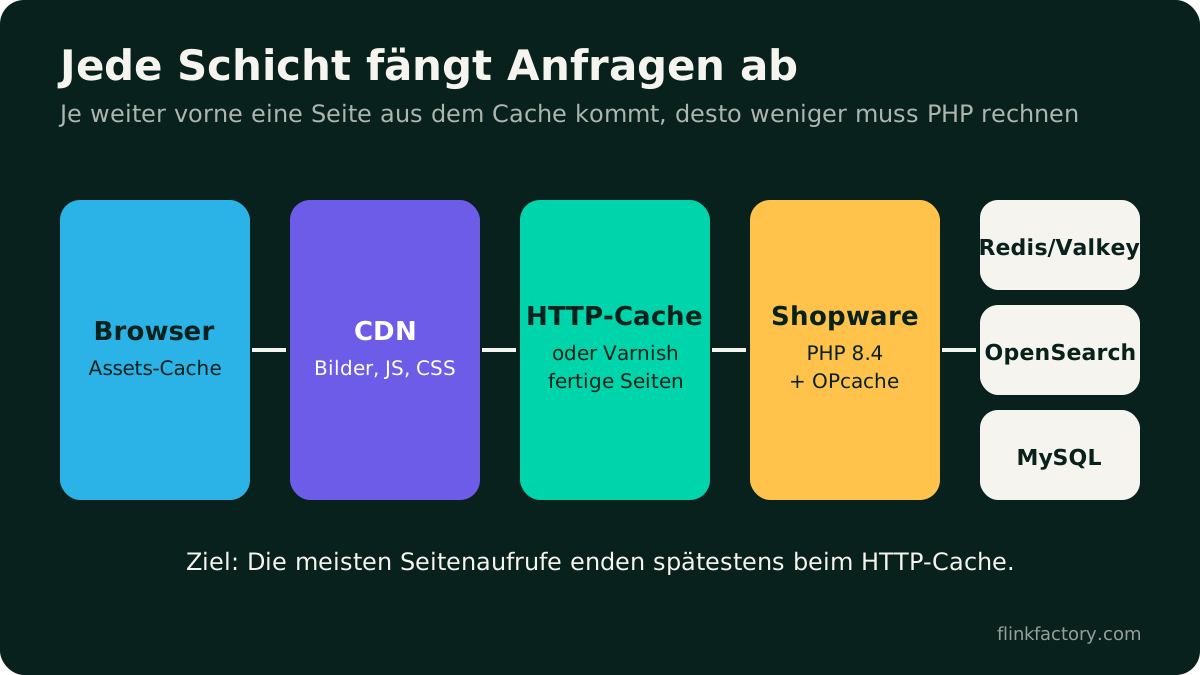
- One server: The built-in HTTP cache is perfectly sufficient for most shops.
- Multiple app servers or heavy traffic: A reverse proxy like Varnish in front of the shop. Shopware ships a default configuration for it.
- Cache invalidation: For shops with many changes, it’s worth storing the delayed invalidation in Redis instead of MySQL (
shopware.cache.invalidation.delay_options). - Static files: Serve them via a CDN with long
Cache-Controltimes.
The most common mistake in practice: a plugin or cookie banner unintentionally makes pages “uncacheable”. Use your browser’s developer tools to check whether the response headers show a cache hit.
3. Configuring PHP and OPcache properly
OPcache keeps compiled PHP code in memory. Among other things, the Shopware documentation recommends:
opcache.validate_timestamps=0– but then clear the OPcache on every deploymentopcache.max_accelerated_filesset to at least 20000opcache.interned_strings_buffer=20zend.assertions=-1andrealpath_cache_ttl=3600
Plus a few small, low-effort helpers: dump the .env to a PHP file with bin/console system:setup --dump-env, set the log level to error in production and, if all plugins are managed via Composer, optimize the autoloader with classmap-authoritative.
4. Message queue and scheduled tasks via CLI worker
Shopware does a lot of work in the background: indexing, emails, cache invalidation, exports. By default, the so-called admin worker steps in for this as long as someone has the Administration open. That’s not suitable for a live shop.
By default, Shopware uses the database as its queue. Under heavy load, the documentation recommends a dedicated transport such as RabbitMQ or Redis.
5. Redis/Valkey and OpenSearch
- Redis or Valkey takes load off the database: as a cache backend, for sessions, counters (increment storage) and number ranges. From medium traffic upward, you’ll notice the difference clearly.
- OpenSearch handles search and listings. For small catalogs, the MySQL search is often sufficient, but from a few thousand products and many filters, OpenSearch becomes noticeably faster. Set
SHOPWARE_ES_THROW_EXCEPTION=1so a broken search doesn’t silently fall back to the slow MySQL search. - Reduced listing data: Since Shopware 6.7.12, you can configure per sales channel that listings only load the product data they need (“Load reduced product data in listings”). This only works if your theme and plugins don’t need extra fields in the listing, so test it first.
6. Images: the biggest lever for LCP
The largest element in the visible area, often a banner or product image, determines the Largest Contentful Paint (LCP).
- The right sizes: Define suitable thumbnail sizes in the Administration and don’t upload 5,000-pixel originals.
- Modern formats: WebP is standard by now. For AVIF and automatic conversion, you’ll usually need a plugin or a CDN service.
- Remote thumbnails: Since Shopware 6.6.4, you can hand off thumbnail generation to an external image service (documentation).
- Lazy loading, but not for the first image: Images below the fold can load later, but the hero image should come right away.
For Shopping Experiences: a clean layout with a few well-compressed images beats five sliders stacked on top of each other. With Responsive Display, you can also hide heavy elements on smartphones instead of just shrinking them.
7. Core Web Vitals 2026: INP is the new bottleneck
Since March 2024, Interaction to Next Paint (INP) has been part of the Core Web Vitals. It measures how quickly the page responds to clicks and input. The thresholds for “good” according to web.dev:
| Metric | Good | Needs improvement | Poor |
|---|---|---|---|
| LCP (load time of the largest element) | ≤ 2.5 s | up to 4 s | > 4 s |
| INP (responsiveness) | ≤ 200 ms | up to 500 ms | > 500 ms |
| CLS (layout shift) | ≤ 0.1 | up to 0.25 | > 0.25 |
What’s assessed is the 75th percentile of real user data, separately for mobile and desktop. Typical INP slowdowns in Shopware shops are tracking scripts, chat widgets, heavy sliders and plugins that load a lot of JavaScript on every page. Go through your extensions critically: whatever isn’t used goes.
8. Cleaning up plugins and themes
Every plugin can add queries, events and JavaScript. That’s no reason to do without extensions, but it is a reason to clean up regularly:
- Completely uninstall deactivated plugins you no longer need.
- Avoid duplicate features (e.g. two popup or tracking solutions).
- When customizing your theme, avoid large JavaScript libraries that are only loaded for a single effect.
- After every Shopware update, recompile the theme and rebuild the cache.
Checklist
- PHP 8.4, OPcache configured as recommended by Shopware
-
SHOPWARE_HTTP_CACHE_ENABLED=1, cache hits checked in the browser - Admin worker off,
messenger:consumeandscheduled-task:runrunning as services - Redis/Valkey for cache and sessions (from medium traffic)
- OpenSearch for large catalogs
- Suitable thumbnail sizes, WebP, hero image without lazy loading
- PageSpeed Insights: LCP, INP and CLS in the green
- Unnecessary plugins and scripts removed
Conclusion
Performance isn’t a one-time project, it’s hygiene. With current PHP, an active HTTP cache, smoothly running background processes and sensible images, you’ve done 80% of the work. The field data in PageSpeed Insights will show you the rest. Our review of the 6.7 updates sums up what else is new in Shopware 6.7.
Your shop is still too slow, or you want to know which plugin is slowing it down? Talk to us. We’ll analyze your shop and get it up to speed.
Sources
You might also like
Shopware 6.7 in Review: What the 2026 Updates Delivered
Eleven minor releases, a withdrawal button, an AI sales channel and new mandatory EU information: here's what Shopware 6.7 brought merchants in 2026, and what to watch out for when you update.
November 9, 2026 · 6 minPluginsThe Best Shopware 6 Plugins for 2026
Our updated picks for 2026: which Shopware 6 plugins really make a difference, what Shopware 6.7 can now do on its own, and what to look for when choosing.
July 20, 2024 · 7 min