
Documentation
Automatic Language Switch
Version 3.0.0 · updated November 18, 2026

Overview
Many visitors land in the “wrong” language of your shop via Google, ads or shared links. Automatic Language Switch compares the languages set in the browser with your sales channel’s languages. If another language is a better fit, a popup in the current shop language asks 1 – with the name of the detected language 2 – and the visitor switches with one click 3 or stays 4. Alternatively, the app redirects without asking.
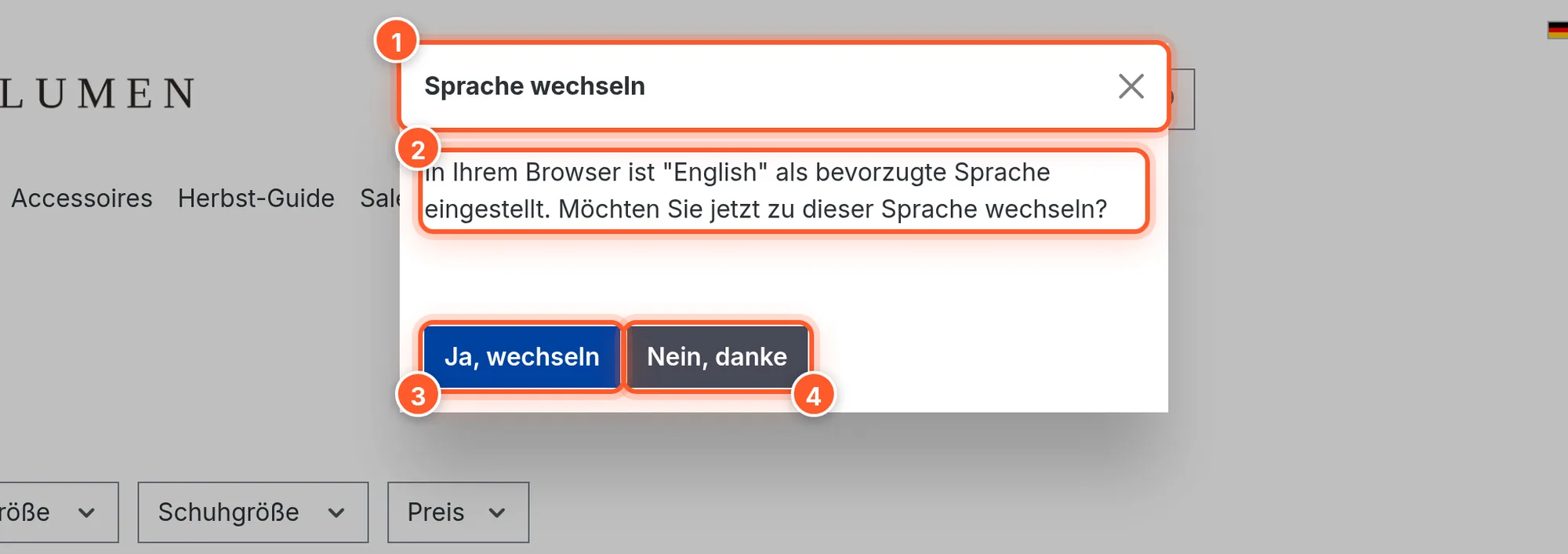
The extension is built as an app and runs in self-hosted shops as well as in Shopware Cloud. It integrates without template changes into all themes based on the Shopware default theme (Bootstrap 5) and supports both the classic and the ESI header rendering (Shopware 6.6 and 6.7).
Setup
- Book the app in the Shopware Store, then install and activate it under Extensions › My extensions.
- Done – out of the box, detection is active and switching works via popup. You change the settings under ⋯ › Configure (see Settings).
- Test it: set a different language as the preferred language in your browser (or open a private window with a different browser language), open your shop and click Accept all cookies in the cookie banner. The popup appears right after.
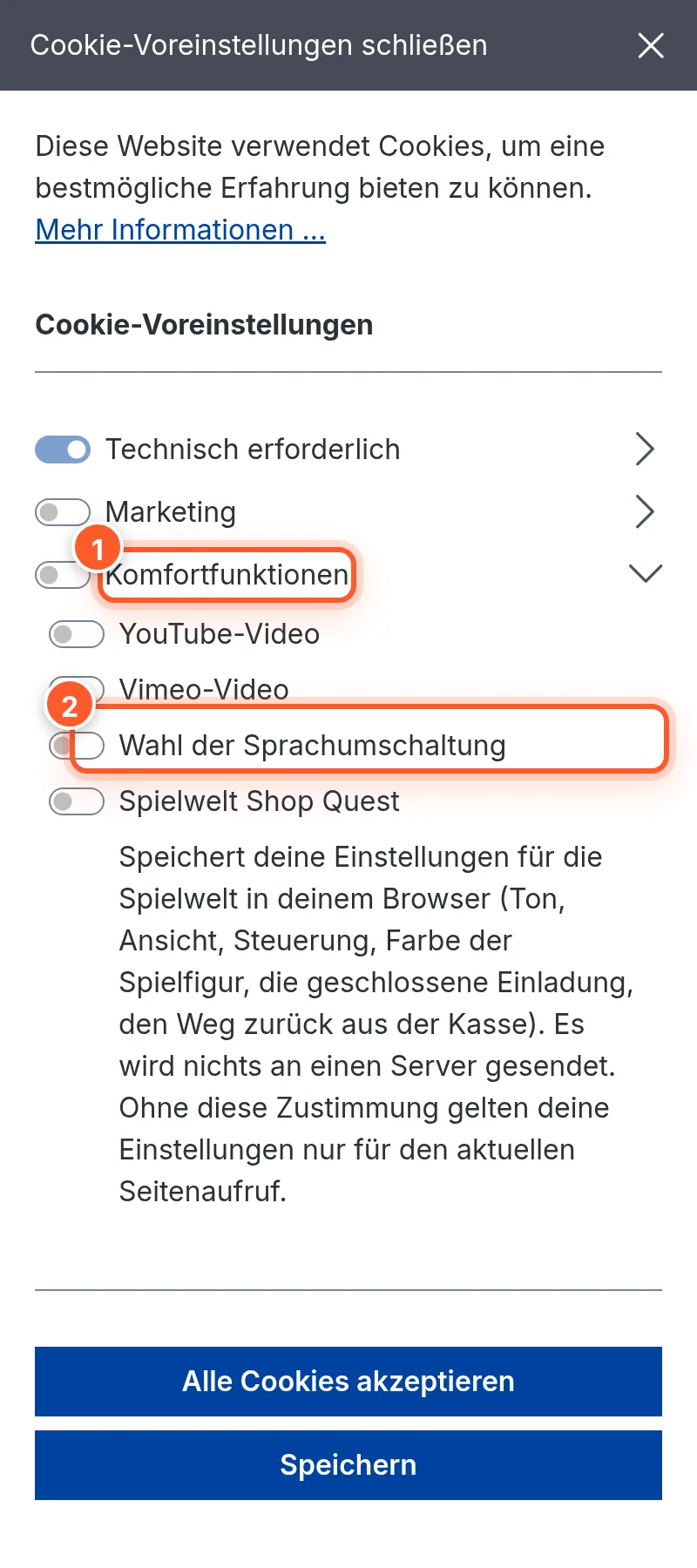
Detection only starts once the visitor has accepted the Comfort features. Anyone who only chooses “technically required” cookies is neither asked nor redirected. If you don’t see a popup while testing, delete your shop’s cookies and accept again.
How detection works
- The visitor accepts the comfort features in the cookie banner (or already did so on an earlier visit).
- The app reads the list of preferred browser languages in their order and only compares the main language:
de-ATorde-CHmatch a storefront languagede-DE,en-USmatchesen-GB. - The first browser language that also exists in the sales channel decides:
- If it’s the currently active language, nothing happens.
- If it’s a different language, the popup appears – or the visitor is redirected directly.
- When switching, the visitor stays on the same page (product, category, home page …), just in the new language. Technically, the app uses Shopware’s own language switch for this.
- The decision is saved for 30 days: after “Yes, switch”, “No, thanks”, the close button, the Esc key or a click outside the popup, the visitor isn’t asked again – not on other pages either.
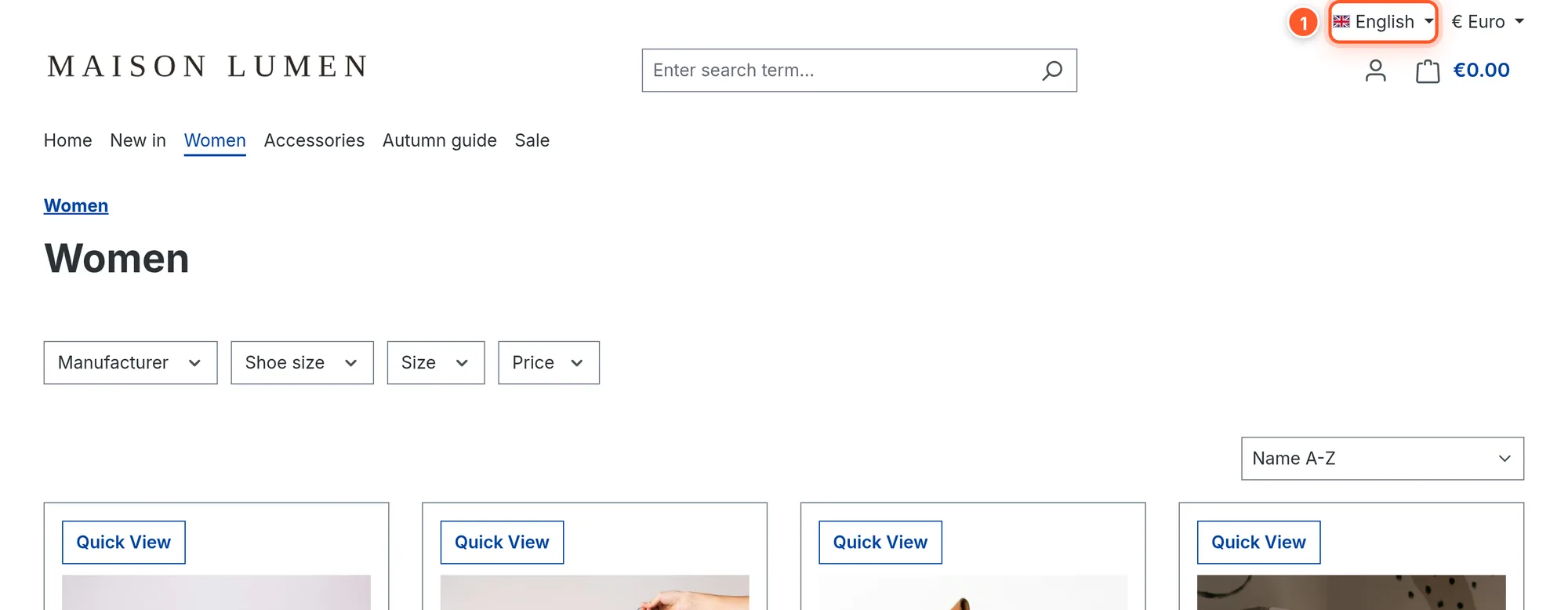
The result after “Yes, switch”: the same page in the detected language, and the regular language switcher in the header 1 now shows the new language.
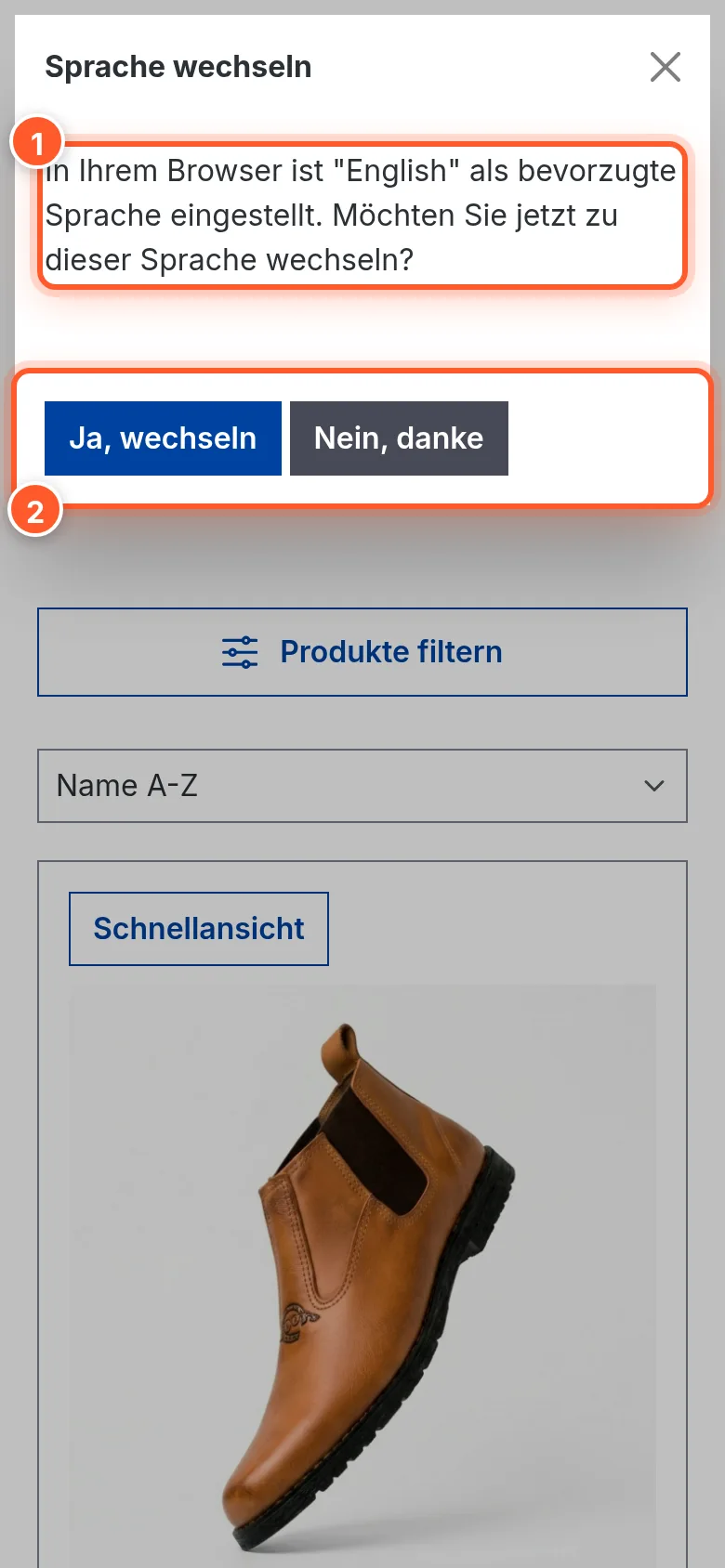
On smartphones, the same popup appears in full width; the buttons are big enough to tap.
Popup or automatic redirect
Popup (default): The visitor decides. This is the friendliest option when visitors deliberately open a specific language version (e.g. German learners or expats).
Automatic redirect: Switch off Let user decide to switch languages. The visitor is then redirected to their language once, right after giving consent – without a popup. Since this switch is also saved for 30 days, the visitor can switch back at any time using the regular language switcher without being redirected again.
Settings
Found under Extensions › My extensions › Language switch automatic or via popup › ⋯ › Configure, card General settings.
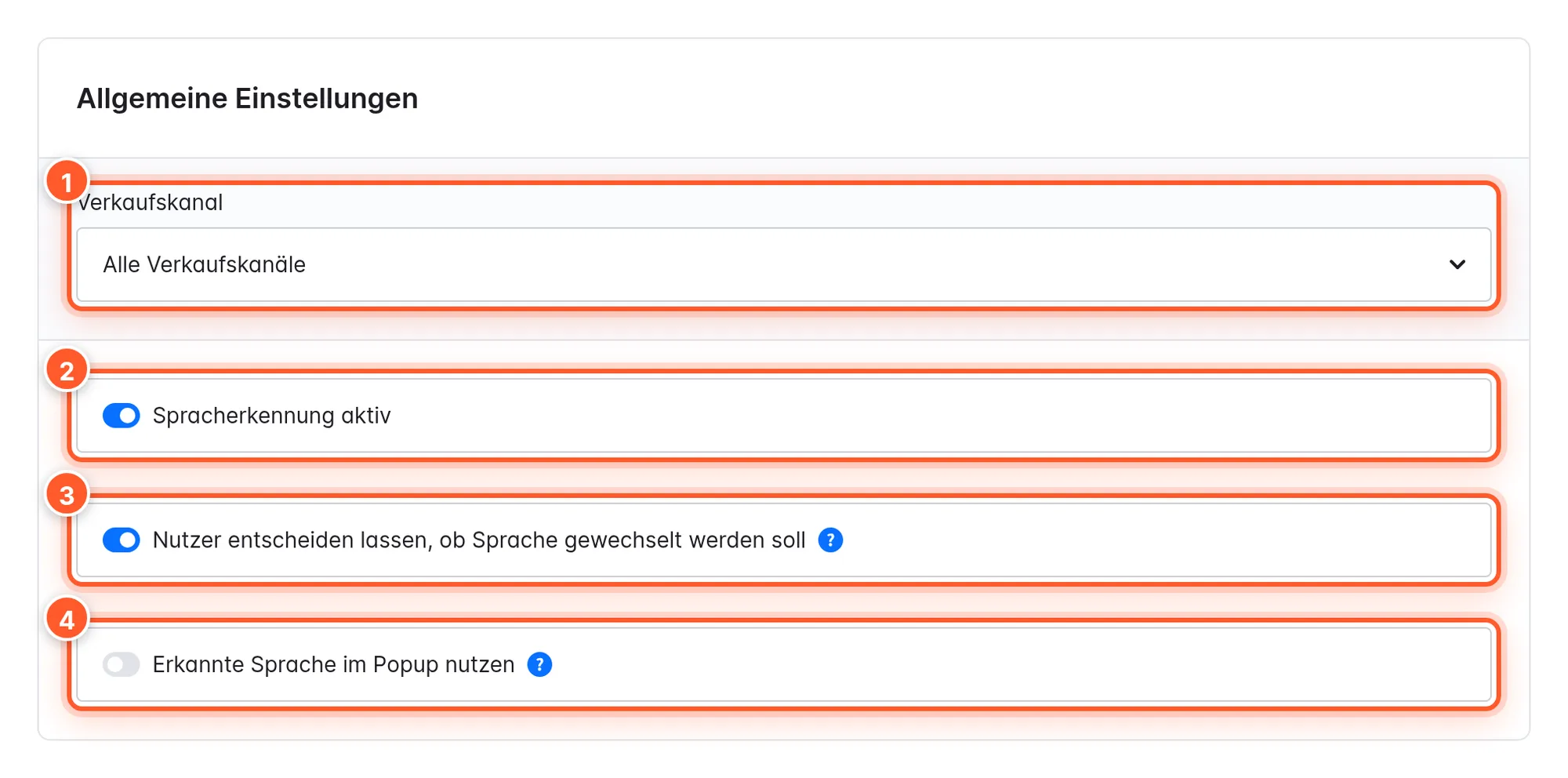
| Setting | Effect | Default |
|---|---|---|
| Language detection active 2 | Switches the app on or off completely. Off: visitors always stay in the language they opened. | on |
| Let user decide to switch languages 3 | On: popup with “Yes, switch” / “No, thanks”. Off: automatic redirect without asking. | on |
| Use detected language in popup 4 | On: the popup text isn’t shown in the current shop language but in the detected browser language – so a French visitor reads the question in French. For this, the app uses its built-in translations for 18 languages. | off |
With the Sales Channel selector 1 you can configure everything differently per sales channel – e.g. popup in the main shop, automatic redirect in a country shop.
Shopware 6.7: In version 3.0.0, the popup doesn’t open in Shopware 6.7 when Use detected language in popup is active (script error in the browser). Keep the option switched off on 6.7 – the popup then reliably appears in the current shop language.
Texts & languages
The popup texts come from Shopware’s snippets and can be customized under Settings › Shop › Snippets (filter for flink-switcher):
| Snippet | English default text |
|---|---|
flink-switcher.switchLangModalTitle | Switch language |
flink-switcher.switchLangModalText | Your browser has ”{$languageName}” set as the preferred language. Do you want to switch to this language now? |
flink-switcher.switchLangModalSwitchButton | Yes, switch |
flink-switcher.switchLangModalCancelButton | No, thanks |
flink-switcher.switchLangModalOtherLangText | Or select another language: |
flink-switcher.cookieName | Language switch choice |
The {$languageName} placeholder is replaced with the name of the detected language – as the language is named in your shop (Settings › Shop › Languages). If you want to see “Deutsch” instead of “German” there, rename the language accordingly.
Translations are included for 18 languages: German, English, French, Spanish, Italian, Dutch, Portuguese, Polish, Russian, Czech, Bulgarian, Turkish, Greek, Swedish, Danish, Finnish, Latvian and Indonesian.
Check the included texts for your shop’s languages: in version 3.0.0 the Spanish text is accidentally Estonian, and in Danish the heading is English (“Switch language”). You can override them in seconds via the snippets.
Cookies & privacy
The app registers the entry “Language switch choice” (cookie flink-language-ignore) in the Comfort features cookie group. Without consent, no detection takes place.
After a decision, the following are saved for 30 days:
flink-language-ignore– remembers that a decision has already been made,flink-language-switched-language– the ID of the chosen language.
Detection runs entirely in the visitor’s browser. No personal data is stored or sent to flink or third parties.
Tips & hidden features
- The order of browser languages matters: A visitor with “English, German” in the browser gets the offer for English on the German storefront, even if they understand German. With “German, English”, nothing happens on the German storefront.
- Country variants are grouped: Only the main language counts for detection – you don’t need a separate storefront language for Austria or Switzerland for German-speaking visitors to land correctly.
- If the browser language doesn’t exist in the shop (e.g. Spanish in a DE/EN shop), the app checks the next language in the browser list. If none matches, everything stays as it is.
- Control it per sales channel: Only the main shop should ask, the outlet channel shouldn’t? Switch off Language detection active for the outlet sales channel.
- When testing, open a new private window each time: because of the 30-day memory, the app won’t ask again otherwise. In Chrome you change the language under Settings › Languages, in Firefox under Settings › General › Language.
- Language selection in the popup: In Shopware 6.6 the popup also shows “Or select another language:” with all the sales channel’s languages. In Shopware 6.7 (header via ESI) this selection is missing in version 3.0.0 – visitors then use the regular language switcher in the header.
Frequently asked questions
The popup doesn’t appear.
Check in this order: Has the visitor accepted the Comfort features? Is the first matching browser language really different from the active storefront language? Was a decision already made in the last 30 days (delete cookies)? Does the sales channel have at least two languages with domains? On Shopware 6.7, also switch off Use detected language in popup (see above). Clear the cache after changing the configuration.
The popup appears on every page view.
Then the browser can’t save the decision cookies – e.g. because of a browser extension that blocks cookies, or a consent tool that deletes the app’s cookies. In your consent tool, allow flink-language-ignore and flink-language-switched-language as comfort cookies.
Does the app work with an external consent tool (Usercentrics, Cookiebot …)?
The app reacts to Shopware’s cookie consent. If a tool replaces the Shopware banner, it has to set the Shopware cookie flink-language-ignore on consent (value 0) or trigger Shopware’s cookie update event – otherwise detection doesn’t start.
Are search engines redirected?
No. Crawlers don’t accept cookie banners, so detection doesn’t kick in for them. Your language versions stay individually indexable.
Do I need a separate domain for each language?
As usual in Shopware, each language needs a domain in the sales channel (e.g. shop.de/ and shop.de/en/). The app only switches between languages the sales channel offers.