
E-Invoicing from 2027: What Shopware Merchants Need to Change Now
The next stage of Germany’s e-invoicing obligation starts in six weeks. From January 1, 2027, businesses with a prior-year turnover above €800,000 may no longer send invoices to other businesses in Germany as a plain PDF or on paper. It has to be a real e-invoice. A year later, the same applies to everyone.
For many online shops, that sounds like something for the accounting department. But if you sell to business customers, whether you run a pure B2B shop or a B2C shop where tradespeople, practices or agencies also order, your shop is where the invoice is created. The good news: Shopware already has the technology built in. You just need to set it up.
The timeline
The e-invoicing obligation comes in three stages. The first is already here: since January 1, 2025, every business must be able to receive e-invoices. For sending, transition periods apply, and they’re now running out one by one (IHK Stuttgart).
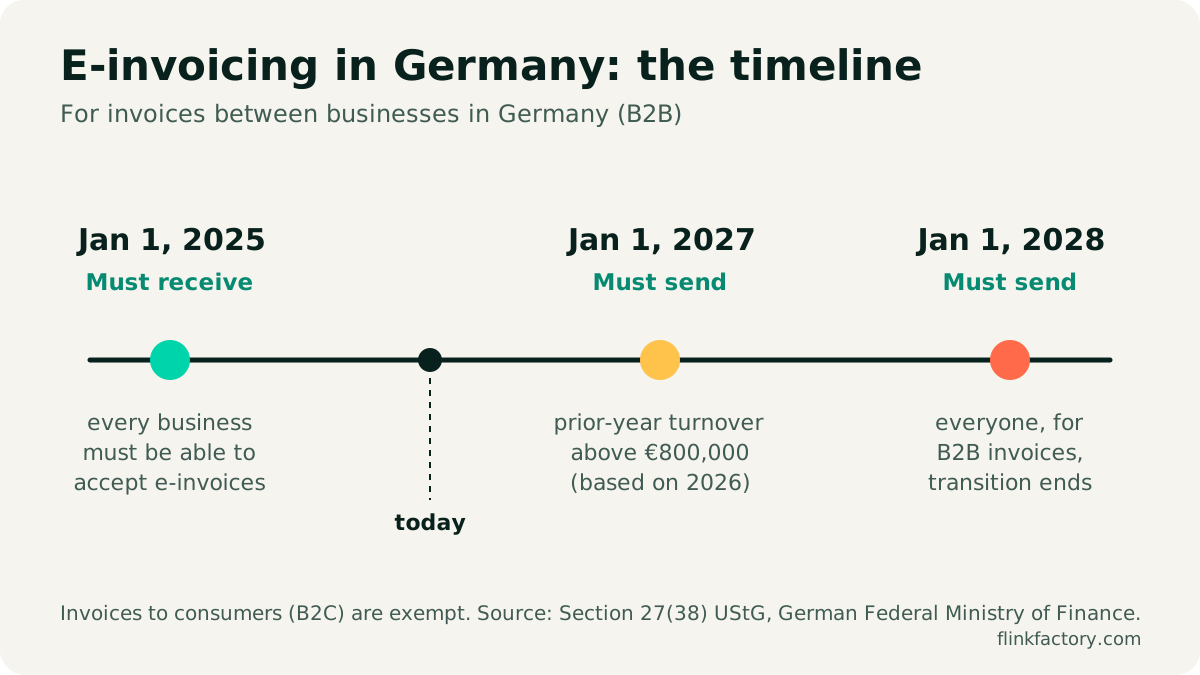
| From | Who | What applies |
|---|---|---|
| Jan 1, 2025 | all businesses | must be able to receive and process e-invoices |
| Jan 1, 2027 | prior-year turnover above €800,000 | B2B invoices only as e-invoices |
| Jan 1, 2028 | all businesses | B2B invoices only as e-invoices |
You’ll keep reading that the deadline is being postponed. The German Confederation of Skilled Crafts (ZDH) is indeed calling for the 2027 stage to be moved to 2028 (ZDH). But nothing has been decided, and there’s no draft bill (Händlerbund). So plan for January 1, 2027.
Does this affect your shop?
The obligation doesn’t depend on your shop, but on each individual invoice. Three questions settle almost every case:
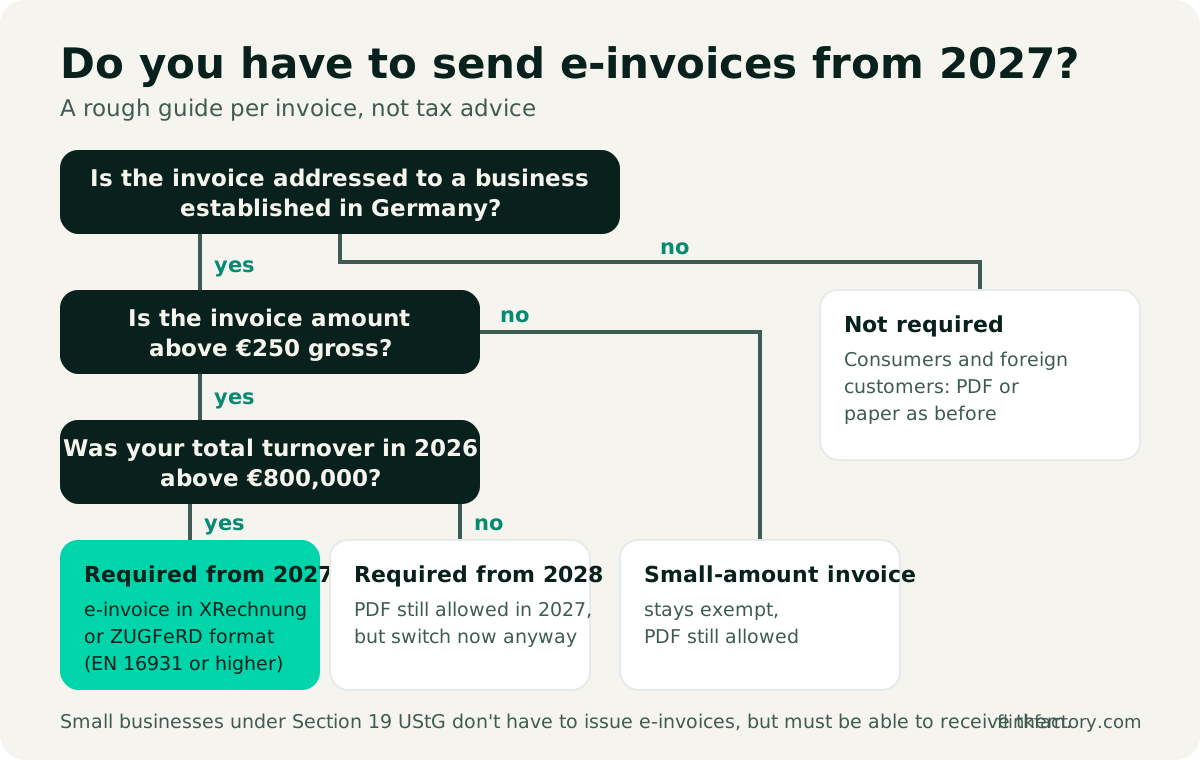
- Consumers (B2C): no obligation. You can keep sending a regular PDF.
- Business customers abroad: the German obligation only covers sales between businesses that are both established in Germany. Other EU countries are introducing their own rules (Belgium, for example, since 2026), which you need to check separately.
- Small-amount invoices up to €250 gross are exempt (German Ministry of Finance: e-invoicing FAQ). In many shops with small baskets, that takes a large share of B2B orders out of scope, but not all of them.
- Small businesses under Section 19 UStG (the German small business scheme) don’t have to issue e-invoices, but must be able to receive them.
What exactly is an e-invoice?
A PDF sent by email is not an e-invoice in the legal sense. What’s meant is a structured data set following the European standard EN 16931 that accounting software can import without anyone retyping it. Two formats are common in Germany:
| Format | What it is | Who it suits |
|---|---|---|
| XRechnung | a pure XML file, hard for humans to read without a viewer | public authorities, large customers with automated accounting |
| ZUGFeRD | a PDF with an embedded XML file (“hybrid”) | almost everyone: people read the PDF, software reads the XML |
With ZUGFeRD, the profile matters: MINIMUM and BASIC WL aren’t enough. From EN 16931 (formerly COMFORT) upwards, it’s a valid e-invoice. For shops, the hybrid format is usually the best choice. Your customer can open the invoice as usual, and their accounting can still process it automatically.
What Shopware already does
Shopware creates e-invoices without an additional plugin. We looked at the Shopware 6.7 code: the e-invoice is created in the XRechnung 3 profile, i.e. following EN 16931, and validated against the format’s rules before it’s saved. If required information is missing, Shopware stops with an error message instead of sending an invalid invoice.
There are several document types:
- Invoice: ZUGFeRD E-invoice: the XML file only
- Invoice: PDF with embedded ZUGFeRD E-invoice: the hybrid PDF
- plus matching variants for cancellation invoices and credit notes, since Shopware 6.7.9 (Release News April 2026)
In an order, you’ll find them under Documents → Create document. Turn on the “Show ZUGFeRD variants” toggle there to see the e-invoice types.
E-invoicing in Shopware in five steps
1. Fill in your company details completely
Under Settings → Shop → Documents, open the invoice (and the ZUGFeRD document types too) and fill in the company details: company name, address, tax number and/or VAT ID, email address and bank details. This data ends up as the seller information in the XML. Without a company name, Shopware won’t create an e-invoice, a mistake that comes up regularly in the Shopware forum.
2. Capture business customers properly
To know who needs an e-invoice, business customers should be identifiable as such at checkout. Under Settings → Shop → Login & registration, enable the choice between private and business customer, and ask for the company name and VAT ID. Otherwise, especially in B2C shops, business orders end up in the system as “private customer with a company name in the address line”.
3. Create e-invoices automatically
In the Flow Builder, you can have invoices created automatically, for example on the trigger “Order placed” or when the status changes to “shipped”. Instead of the regular invoice, choose the type PDF with embedded ZUGFeRD E-invoice and attach it to the email in the “Send email” action.
You can restrict the flow to business customers with a rule. Often it’s simpler to send the hybrid PDF to all customers. Consumers see a perfectly normal PDF, and business customers automatically get a valid e-invoice.
4. Test with real orders
In a staging environment, create test orders that reflect your day-to-day business: with a discount, shipping costs, different tax rates, a partial credit note and a cancellation. Check the generated files with a free validator (for the plain XML file, for example the e-invoice validator of the state of Baden-Württemberg) and try importing them into your accounting software.
5. Align accounting and archiving
Agree with your tax advisor or accounting tool on how invoices should arrive there: via an interface, an email inbox or an export. Important: the XML file must be archived unchanged. A printout of the PDF isn’t enough.
Checklist for the turn of the year
| Task | Done by |
|---|---|
| Roughly estimate your 2026 turnover: above or below €800,000? | end of November |
| Update Shopware to a current 6.7 version | early December |
| Fill in company details in all invoice document types | early December |
| Set up a flow for the hybrid PDF and check it with test orders | mid-December |
| Check invoices with a validator and your accounting software | mid-December |
| Let business customers know invoices now arrive as e-invoices | before Jan 1, 2027 |
Conclusion
E-invoicing is less work for Shopware merchants than it first sounds: the technology is already in the system, and nothing changes for consumers. If you sell to businesses in Germany and your 2026 turnover is above €800,000, don’t leave the setup until the last day. And for everyone else: 2028 is coming. If you switch now, it’s done.
Need help with the setup, a connection to your accounting, or special cases like the Leitweg-ID for public-sector customers? Get in touch. We can help with custom development for Shopware.
This article is not tax advice. As of November 21, 2026.
Sources
- IHK Stuttgart: end of the transition period for businesses with more than €800,000 turnover (German)
- German Federal Ministry of Finance: e-invoicing FAQ (German)
- ZDH: postponing the e-invoicing obligation to January 1, 2028 (German)
- Händlerbund: is the e-invoicing obligation being postponed? (German)
- Onlinemarktplatz.de: e-invoicing obligation 2027 for online merchants (German)
- Shopware Developer Docs: documents
- Shopware Release News April 2026
You might also like
Shopware 6.7 in Review: What the 2026 Updates Delivered
Eleven minor releases, a withdrawal button, an AI sales channel and new mandatory EU information: here's what Shopware 6.7 brought merchants in 2026, and what to watch out for when you update.
November 9, 2026 · 6 minLegalThe Withdrawal Button: Mandatory Since June 19, 2026 – How to Do It in Shopware
Since June 19, 2026, B2C online shops selling to consumers in Germany have needed an electronic withdrawal function. What § 356a BGB requires, how Shopware implements it from version 6.7.9 and which mistakes to avoid.
July 9, 2026 · 7 min